Container Security
A container is a process with namespaces, not a sandbox you can forget about. Harden every layer: minimal, pinned, scanned images; non-root users; dropped capabilities; read-only filesystems; and a few things you must never do.
🎯 What you'll learn
- What namespaces and cgroups do and don't isolate
- Image hygiene: minimal bases, pinning, scanning, SBOM, signing
- Runtime hardening: non-root, capabilities, read-only fs, seccomp
- Dangerous anti-patterns and the orchestrator layer
📚 Before you start
1What a Container Does and Doesn't Isolate
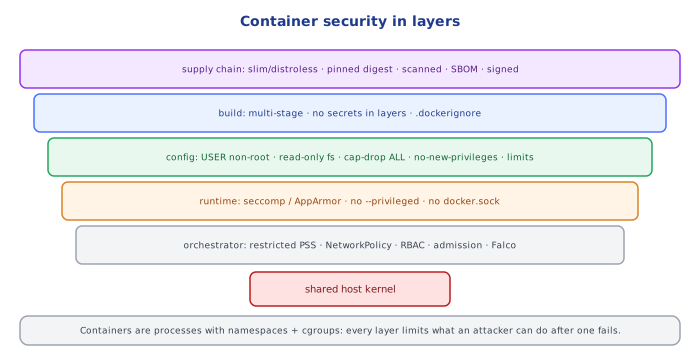
A container is a normal Linux process with namespaces (its own view of PIDs, mounts, network, hostname, users) and cgroups (resource limits) — 01-docker_fundamentals/. All containers share the host kernel. A kernel exploit, a misconfiguration that hands the container host resources, or a runtime bug can let a process escape to the host. So container security is layers of defense:
supply chain (what's in the image) → build (how it's made) → configuration (how it runs)
→ runtime (what it's allowed to do) → host & orchestrator (what's around it)2The Image: Smaller, Pinned, Scanned
- Minimal bases:
-slim, Alpine, distroless, orscratch(multi-stage builds,06-multi_stage_builds/). Fewer packages = fewer CVEs and no shell for an attacker. - Pin versions — and ideally digests:
FROM node:22.11.0-bookworm-slim@sha256:…, so a tag can't silently change underneath you. - Scan images in CI (Trivy, Grype, Docker Scout) and fail on fixable critical/high CVEs; rescan regularly — new CVEs appear for old images.
- Rebuild often to pick up base-image patches.
- No secrets in images — not in
ENV,ARG, files or layers. Inject at runtime (orchestrator secrets, mounted files, a secrets manager). - SBOM and signing: generate a software bill of materials (Syft), sign images (cosign/Sigstore) and verify signatures at deploy time.
3Run as Non-Root
By default a container process is root (uid 0). Without user namespaces, that's the same uid 0 as on the host — if it escapes (or a host path is mounted), it's root on the host.
RUN groupadd -r app && useradd -r -g app -u 10001 app
USER 10001
In Kubernetes: securityContext: { runAsNonRoot: true, runAsUser: 10001 }.
4Drop Privileges at Runtime
docker run \
  --user 10001:10001 \
  --read-only --tmpfs /tmp \              # immutable root filesystem
  --cap-drop ALL --cap-add NET_BIND_SERVICE \   # only the capabilities you need
  --security-opt no-new-privileges \      # setuid binaries can't escalate
  --pids-limit 200 --memory 512m --cpus 1 \     # resource limits (DoS containment)
  --network app-net \
myapp:1.4.2| Setting | Protects against |
|---|---|
| non-root user | escalation to host root on escape |
--cap-drop ALL | abuse of kernel capabilities (e.g. NET_RAW, SYS_ADMIN) |
| read-only root fs | attackers writing tools/backdoors into the container |
no-new-privileges | escalation via setuid/setgid binaries |
| seccomp / AppArmor / SELinux profiles | dangerous syscalls (Docker's default seccomp blocks ~44) |
| resource limits | fork bombs, memory exhaustion of the host |
5Never Do These
--privileged— disables nearly all isolation; effectively root on the host.- Mount the Docker socket (
-v /var/run/docker.sock:/var/run/docker.sock) — anyone in the container controls the Docker daemon, i.e. the host. - Mount sensitive host paths (
/,/etc,/proc,/var/run). --network host/--pid hostwithout a very good reason.- Expose the Docker daemon over TCP without TLS.
6Orchestrator Layer (Kubernetes)
- Pod Security Standards (
restrictedprofile) enforce non-root, no privilege escalation, dropped capabilities, seccompRuntimeDefault. - NetworkPolicies: default-deny, then allow only the flows each service needs.
- RBAC for service accounts; don't automount tokens that aren't needed.
- Admission control (Kyverno, OPA Gatekeeper) to reject unsigned or unscanned images and insecure specs.
- Runtime detection (Falco): alert on shells spawned in containers, unexpected outbound connections, writes to sensitive paths.
Under the HoodCapabilities, Seccomp and User Namespaces▾
Linux split root's powers into ~40 capabilities (CAP_NET_ADMIN, CAP_SYS_ADMIN, CAP_CHOWN, …). Docker starts containers with a reduced default set (14 or so); --cap-drop ALL removes the rest, so even uid 0 inside can't, say, change network config or load kernel modules. CAP_SYS_ADMIN is the famous "new root": it allows mounts and many escape techniques — granting it nearly equals --privileged.
Seccomp filters system calls with a BPF program evaluated by the kernel on every syscall; Docker's default profile denies calls like keyctl, add_key, unshare (in many cases), mount, kexec_load and ptrace on older kernels — shrinking the kernel attack surface a container can reach.
User namespaces (userns-remap, rootless Docker/Podman) map uid 0 inside the container to an unprivileged uid range on the host (e.g. 100000–165535). Then even a process that is "root" in the container and escapes is just an ordinary user on the host. Rootless mode goes further and runs the whole daemon without root privileges.
⚠️ Common Pitfalls
- Running as root because it's the default.
latesttags and unpinned bases — unreproducible, unreviewed changes.- Secrets baked into images (
ENV API_KEY=...). --privilegedor the Docker socket mounted "to make it work".- Scanning once at build time and never again.
- No resource limits — one container can starve the node.
📋 Quick Reference
image:   slim/distroless · pinned (digest) · scanned in CI · SBOM + signed · no secrets
build:   multi-stage · USER non-root · .dockerignore
run:     --read-only --cap-drop ALL --security-opt no-new-privileges · limits · seccomp default
never:   --privileged · docker.sock mount · host namespaces
k8s:     restricted PSS · NetworkPolicy default-deny · RBAC · admission policies · runtime detection
🧠 Key takeaways
- Containers share the host kernel: isolation is real but thinner than a VM's.
- Images: minimal, pinned by digest, scanned in CI, rebuilt often, no secrets, signed with an SBOM.
- Runtime: non-root,
--cap-drop ALL, read-only root fs, no-new-privileges, resource limits. - Never
--privileged, never mount the Docker socket or sensitive host paths.
🎤 Interview Q&A
Q1How do you secure container images?core▾
Minimal trusted base images, regular rebuilds for patches, vulnerability scanning (Trivy, Grype, ECR/Inspector) in CI, no secrets in images, pinned digests, signed images (cosign) and SBOMs.
- What's an SBOM? A software bill of materials listing image components.
Q2Why shouldn't containers run as root?core▾
If an attacker escapes the app or the container, root inside often maps to dangerous privileges on the host. Run as a non-root user, use read-only root filesystems, and drop Linux capabilities.
- Rootless Docker? Runs the daemon itself without root privileges.
Q3What runtime hardening options exist?senior▾
--read-only, --cap-drop=ALL (add back only needed capabilities), no-new-privileges, seccomp and AppArmor/SELinux profiles, resource limits, and never --privileged or mounting the Docker socket.
- Why is mounting docker.sock dangerous? It grants control of the host's Docker daemon, effectively root.
Q4How does Kubernetes enforce container security?core▾
Pod Security Standards (restricted profile), securityContext (runAsNonRoot, readOnlyRootFilesystem, capabilities), NetworkPolicies, admission controllers (Kyverno/OPA Gatekeeper) and runtime detection (Falco).
- What replaced PodSecurityPolicy? Pod Security Admission.
Q5How do you handle a critical CVE in a base image?core▾
Identify affected images via scanning/SBOMs, rebuild on a patched base, run tests, redeploy, and verify; automate base-image update PRs (Renovate/Dependabot).
- Is every CVE urgent? Prioritize by exploitability and whether the vulnerable component is actually used.
🛠️ Practice exercises
Each exercise is a file in this topic folder. Code exercises are self-checking: run them and make the checks pass.
✅ Check yourself
Answer the questions — feedback is instant.
FROM node:22@sha256:… protects against…