RabbitMQ
RabbitMQ is a smart broker: producers publish to exchanges, bindings route messages into queues, and acked messages are deleted. Route keys through a live topic exchange, follow acks and redelivery, then tune prefetch, durability and quorum queues.
🎯 What you'll learn
- Exchanges, queues and bindings (AMQP 0-9-1)
- Direct, fanout, topic and headers exchanges with wildcards
- Acknowledgements, redelivery and prefetch
- Durability (durable + persistent), DLX and quorum queues
📚 Before you start
1What RabbitMQ Is
RabbitMQ is a message broker implementing (primarily) the AMQP 0-9-1 protocol (Advanced Message Queuing Protocol). It is the classic "smart broker, dumb consumer" design: RabbitMQ itself decides exactly which queue(s) a message ends up in based on routing rules you configure, and a consumer just connects to a queue and receives whatever arrives. This is a fundamentally different philosophy from Kafka (covered in the next topic), where the broker is closer to "dumb storage" and consumers do the work of deciding what to read.
2The Three AMQP Building Blocks
RabbitMQ's model has three core pieces, and understanding how they connect is the entire key to using RabbitMQ correctly.
| Piece | Role |
|---|---|
| Exchange | Receives messages from producers and decides which queue(s), if any, to route each message to. Producers never publish directly to a queue — they always publish to an exchange. |
| Queue | An ordered buffer that holds messages until a consumer receives and acknowledges them. Consumers attach to queues, never to exchanges. |
| Binding | A rule connecting an exchange to a queue, usually with a routing key pattern, telling the exchange "route matching messages to this queue." |
Producer --publish--> [ Exchange ] --(binding rules)--> [ Queue A ] --> Consumer 1
                                    --(binding rules)--> [ Queue B ] --> Consumer 2
A message published to an exchange with no matching binding is, by default, simply dropped (unless the publisher opts into "mandatory" delivery and handles the returned message).
3Exchange Types
The exchange type determines the matching algorithm used to decide which bound queues receive a given message.
| Exchange type | Routing behavior |
|---|---|
| Direct | Delivers to any queue whose binding key exactly equals the message's routing key. Used for precise, single-destination routing (e.g. routing key payments.failed goes only to the queue bound with exactly payments.failed). |
| Fanout | Ignores the routing key entirely and delivers to every queue bound to the exchange. Used for broadcast — every subscriber gets every message. |
| Topic | Matches the routing key against binding patterns using wildcards: * matches exactly one word, # matches zero or more words (words are separated by .). Used for flexible, hierarchical routing (e.g. a binding of orders.*.created matches orders.eu.created and orders.us.created but not orders.eu.region.created). |
| Headers | Matches on message header key/value pairs instead of the routing key. Rare in practice; topic exchanges cover most of the same use cases more simply. |
Topic exchange example — routing key "orders.eu.created" published:

  binding "orders.*.created"   -> MATCH (one wildcard word: "eu")
  binding "orders.#"           -> MATCH (# covers any remaining words)
  binding "orders.us.created"  -> NO MATCH (exact segment differs)
  binding "orders.eu.cancelled"-> NO MATCH (last segment differs)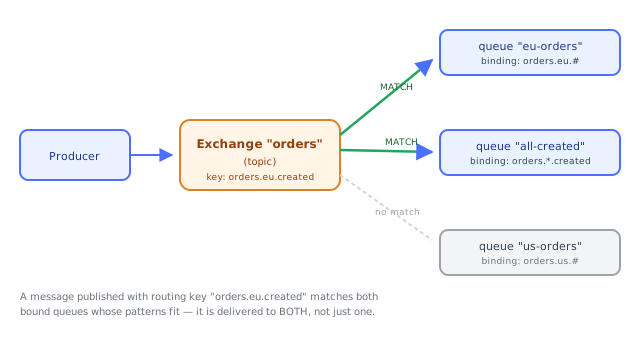
4A Concrete Routing Walkthrough
Imagine an order-processing system publishing events to a topic exchange named orders, with routing keys shaped like orders.<region>.<event>.
Bindings:
  queue "eu-orders"        <- binding key "orders.eu.#"
  queue "all-created"      <- binding key "orders.*.created"
  queue "audit-log"        <- binding key "orders.#"
A message published with routing key orders.eu.created matches all three bindings — it lands in eu-orders, all-created, AND audit-log. A message with routing key orders.us.cancelled matches only audit-log (orders.# covers everything).
This is the mechanism that gives RabbitMQ its flexibility: one producer, one exchange, and any number of independently-evolving consumer teams each defining their own queue and binding pattern without touching the producer or each other.
5Queues: Durable, Exclusive, and Auto-Delete
Queues have properties set at creation time that control their lifecycle:
- Durable — the queue definition survives a broker restart (messages inside still need to be individually marked persistent to survive too — durability of the queue and persistence of its messages are separate settings).
- Exclusive — only the connection that created the queue can use it; deleted automatically when that connection closes. Common for temporary, per-client reply queues.
- Auto-delete — the queue is deleted once its last consumer disconnects.
A typical durable work queue for background jobs is created durable, non-exclusive, non-auto-delete, so it survives broker restarts and keeps accepting messages even with zero consumers connected.
6Basic Consumption and Acknowledgement
A consumer subscribes to a queue and receives messages one at a time (or in a prefetched batch — see Part 2). After successfully processing a message, it sends an ack back to RabbitMQ, which then permanently removes that message from the queue. If the consumer disconnects (or explicitly nacks) before acking, RabbitMQ redelivers the message — to the same consumer on reconnect, or to another consumer in the pool.
Consumer receives message  -> processes it  -> ack()  -> RabbitMQ deletes it from the queue
Consumer crashes before ack -> RabbitMQ detects the dead connection -> requeues the message
                                                                        for another consumer
This ack-then-delete model is the core reason RabbitMQ queues behave like a true work queue: once a message is acked, it is gone, full stop — there is no "replay from the beginning" the way there is with Kafka's log.
1Prefetch (QoS): Controlling How Much a Consumer Can Hold
By default, RabbitMQ pushes messages to a connected consumer as fast as it can, without waiting for previous messages to be acked. If one consumer is slow and others are idle, the slow one can end up holding a huge backlog of unacked messages while fast consumers starve.
Prefetch count (set via basic.qos) caps how many unacknowledged messages the broker will have "in flight" to a given consumer at once. prefetch = 1 means "don't send me a new message until I've acked the one I'm holding" — the simplest way to get even load distribution across a pool of consumers.
prefetch = 10:  broker can push up to 10 unacked messages to this consumer
                 before it must wait for an ack before sending an 11th

prefetch = 1:   strict "one at a time" — best load balancing, but more
                network round-trips (lower throughput per consumer)
Tuning prefetch is a direct throughput-vs-fairness trade-off: higher prefetch means fewer round trips and higher throughput per consumer, but a slow consumer can hoard a large batch while others sit idle.
Two consumers, 100 messages, each message takes 1 s, but consumer A is twice as slow.
prefetch = 50 → each consumer is handed 50 at once; A finishes in 100 s while B idles after 50 s
prefetch = 1  → messages go to whoever is free; both finish in ≈ 67 s
High prefetch increases throughput per consumer; low prefetch gives fair dispatch. Typical values are 10–50 for fast handlers and 1 for slow, uneven jobs.
2Message and Queue Durability
Two independent settings determine whether a message survives a broker restart:
- The queue must be declared
durable— its existence/metadata is written to disk. - The message must be published with the
persistentdelivery mode — its body is written to disk, not just held in memory.
Both are required. A persistent message published to a non-durable queue is lost on restart because the queue itself disappears; a non-persistent message in a durable queue is also lost because the message body was never written to disk.
Durability has a real performance cost — writing to disk on every publish is slower than an in-memory hand-off — so RabbitMQ is usually configured to persist only what actually needs to survive a crash (e.g. order events), while allowing lower-value, high-volume traffic (e.g. live metrics) to skip persistence.
A durable queue with a non-persistent message loses the message on restart; a persistent message in a non-durable queue loses the whole queue. For replication across nodes, use quorum queues.
3Dead Lettering (Setup Mechanics)
A queue can be configured with a dead-letter exchange (DLX) — when a message in that queue is rejected/nacked without requeue, or expires (TTL), or the queue overflows its length limit, RabbitMQ automatically republishes it to the DLX instead of discarding it. The full mechanics and retry-then-redirect pattern are covered in the dedicated Dead Letter Queues topic; the piece worth knowing here is that this is configured as queue arguments at declaration time:
queue.declare("orders", {
  arguments: {
    "x-dead-letter-exchange": "orders.dlx",
    "x-dead-letter-routing-key": "orders.failed"
  }
})4Clustering and Quorum Queues
A single RabbitMQ node is a single point of failure. Production deployments run a cluster of nodes. Two queue types handle replication differently:
| Queue type | Replication model |
|---|---|
| Classic queue (legacy default) | Lives on one node by default; optional mirroring to others was the old HA mechanism, now deprecated. |
| Quorum queue (current recommended default) | Uses the Raft consensus algorithm to replicate the queue's log across multiple nodes. A write is only acknowledged once a majority (quorum) of replicas have persisted it, giving strong consistency and automatic failover if the leader node dies. |
Quorum queues are the modern recommendation for anything where message durability across a node failure matters — they trade a bit of latency (waiting for a quorum of acks) for real fault tolerance, rather than the "hope the mirror caught up" behavior of legacy mirrored classic queues.
Under the HoodThe Real AMQP Exchange-and-Binding Model, Precisely▾
It's worth being exact about what actually happens inside RabbitMQ when a message is published, because it's easy to blur "exchange" and "queue" into one mental blob.
An exchange is not a buffer. It holds no messages and has no memory beyond its bindings table. When a producer publishes, the broker looks up every binding registered against that exchange, evaluates the routing key (or headers) against each binding's pattern, and for every match, copies a reference to the message into that queue's own storage. If a message matches three queues, three independent copies (or, internally, reference-counted deliveries) exist — acking in one queue has zero effect on the message's presence in the others. This is why the topic-exchange walkthrough in Part 1 could deliver the same message into eu-orders, all-created, and audit-log simultaneously: the exchange isn't choosing one destination, it's evaluating every binding independently on every publish.
A queue is a genuine, per-queue, mostly-FIFO log with per-message state. Internally (in the modern Raft-backed quorum queue implementation) each queue keeps its messages in an append-only log, tracks each message's delivery state (unacked, acked, dead-lettered), and only physically reclaims disk space once a message is acked. This looks superficially like Kafka's log — but the crucial difference (spelled out fully in the RabbitMQ vs Kafka topic) is that RabbitMQ's log is a private implementation detail of one queue that gets consumed and discarded, not a durable, independently-addressable stream multiple consumer groups replay at their own offsets. Once every consumer has acked a message, RabbitMQ has no reason to keep it, and doesn't.
Routing decisions happen once, at publish time, not at consume time. This is the opposite of Kafka, where a message's fate (which partition, and later which offset each consumer group reads) is largely decided by consumers pulling at their own pace. In RabbitMQ, the moment a message is published, the exchange has already fully decided every queue it will land in — a consumer simply drains whatever queue it's attached to. This "smart broker" design is what makes RabbitMQ's routing so flexible (topic patterns, multiple simultaneous destinations) but also means routing logic changes require touching exchange/binding configuration, not consumer code.
⚠️ Common Pitfalls
- Publishing directly assuming a queue name works like a destination. There is no way to "publish to a queue" in AMQP — you always publish to an exchange (even the unnamed default exchange, which does direct routing by queue name as a convenience, is still technically an exchange).
- Declaring a durable queue but forgetting
persistent: trueon the message — the queue survives a restart, empty, because the messages inside were never written to disk. - Using prefetch = unlimited (the old default) in a multi-consumer pool — one consumer can end up starving the others by hoarding every in-flight message.
- Assuming a mirrored classic queue gives the same guarantees as a quorum queue — legacy mirroring can lose unsynced messages on failover; quorum queues use actual majority consensus.
- Forgetting that a fanout/topic exchange delivering to multiple queues means multiple independent copies — acking in one consumer's queue does not remove the message from a sibling queue that also matched.
📋 Quick Reference
Producer -> Exchange -> (binding match) -> Queue -> Consumer -> ack -> deleted

Exchange types: direct (exact key), fanout (all bound queues), topic (* / # patterns), headers
Durability: queue must be durable AND message must be persistent
Prefetch:   caps unacked messages in flight per consumer (1 = strict round robin)
Quorum queue: Raft-replicated, majority-ack durability, modern HA default
Dead letter: queue arg "x-dead-letter-exchange" reroutes rejected/expired messages
🧠 Key takeaways
- Producers publish to exchanges; bindings route into queues; consumers read from queues.
- Exchange types: direct (exact), fanout (all), topic (
*one word,#zero or more), headers. - Ack after processing; unacked messages are redelivered on crash; acked messages are deleted.
- Tune prefetch (throughput vs fairness); durability needs durable queue + persistent message; use quorum queues and DLX.
🎤 Interview Q&A
Q1Explain RabbitMQ's model: exchanges, queues and bindings.core▾
Producers publish to an exchange with a routing key; bindings route messages from exchanges to queues; consumers read from queues. Exchange types: direct (exact key match), topic (wildcard patterns like order.*), fanout (all bound queues), headers (match on headers).
- Why route through exchanges? Producers don't need to know which queues exist; routing is configured, not coded.
Q2How do acknowledgements work in RabbitMQ?core▾
With manual acks, the broker keeps a delivered message as unacked until the consumer acks it; if the consumer dies, it's redelivered. nack/reject can requeue or dead-letter it. Prefetch (basic.qos) limits unacked messages per consumer for fair distribution and backpressure.
- Why set prefetch? Without it, one consumer can receive thousands of messages and others sit idle.
Q3How do you make messages survive a broker restart?core▾
Declare queues as durable, publish messages as persistent, and use publisher confirms so the producer knows the broker stored them. For node failures, use quorum queues (Raft-replicated) instead of classic mirrored queues.
- What are quorum queues? Replicated queues using Raft consensus, the recommended HA option.
Q4When would you choose RabbitMQ over Kafka?senior▾
For task queues and complex routing, per-message acknowledgements, priorities, delayed/TTL messages and request/reply patterns, at moderate throughput. Kafka fits high-throughput event streams with replay and long retention.
- Can RabbitMQ replay messages? Classic queues delete messages after ack; RabbitMQ Streams add log-style replay.
Q5How do you implement retries with delay in RabbitMQ?core▾
Use a retry queue with a message TTL and a dead-letter exchange pointing back to the main queue (or the delayed-message plugin), with increasing TTLs per attempt, and a final DLQ after max attempts.
- Why not requeue immediately? Immediate requeue causes a hot loop on a failing message.
🛠️ Practice exercises
Each exercise is a file in this topic folder. Code exercises are self-checking: run them and make the checks pass.
✅ Check yourself
Answer the questions — feedback is instant.
# match in a topic binding?* matches exactly one word.