Performance Optimization
Measure first, then cut unnecessary work. See memo skip a 500-row list when the parent re-renders, then calculate how list virtualization shrinks the DOM, alongside code splitting and transitions.
🎯 What you'll learn
- Profiling before optimizing; why components re-render
- React.memo, useCallback/useMemo pairing and custom comparators
- Code splitting with lazy + Suspense
- List virtualization and deprioritizing updates
📚 Before you start
Prerequisite: frontend/react/hooks/06-usememo, 07-usecallback (the mechanics of each hook) and frontend/react/core/04-rendering_and_reconciliation (render vs commit, fiber, lanes). This part is about the applied discipline of when to reach for those tools, plus React.memo, which those two prerequisites don't cover.
1Profile Before You Optimize
Every optimization in this topic has a real cost — extra memory for cached values, extra comparison work per render, more code to maintain. Applying any of them without evidence of an actual problem usually makes things slower, not faster: memo still has to run a comparison on every parent render, and useMemo/useCallback still allocate a dependency array to check every render.
The React DevTools Profiler tab is the source of truth: record an interaction, and it shows which components rendered, how long each took, and — critically — why each one rendered (a badge naming the changed prop, state, context, or "parent re-rendered"). Optimize the components the profiler flags as both slow and frequently re-rendering; leave everything else alone.
2Why a Component Re-renders at All
Three, and only three, root triggers cause a component to render:
- Its own state changed (
useState/useReducer). - Its parent re-rendered (and the component isn't bailed out — see Section 3).
- A context it subscribes to changed identity (
frontend/react/advanced/01-context_api_in_depth).
Everything else — a prop changing, a key changing — is a consequence of one of these three, propagated down through the tree.
3React.memo: Skipping Re-render on Unchanged Props
memo wraps a component so that, on a parent re-render, React first shallow-compares the new props object to the old one; if every prop is Object.is-equal, React skips calling the component function and reuses last render's output.
const ExpensiveRow = memo(function ExpensiveRow({ label, value }: { label: string; value: number }) {
  console.log("rendering", label);
  return <tr><td>{label}</td><td>{value}</td></tr>;
});

function Table({ rows, unrelatedCounter }: { rows: Row[]; unrelatedCounter: number }) {
  // unrelatedCounter changing re-renders Table, but each ExpensiveRow
  // only re-renders if ITS OWN row object changed reference
  return <table>{rows.map((r) => <ExpensiveRow key={r.id} label={r.label} value={r.value} />)}</table>;
}
Without memo, every Table re-render would re-render every ExpensiveRow, regardless of whether that row's data changed.
4The memo + useCallback/useMemo Pairing
memo's shallow comparison is only useful if the props it's comparing are actually stable across renders where nothing relevant changed. A function or object prop built inline defeats it immediately:
function Table({ rows }: { rows: Row[] }) {
  // BAD: a new function every render — ExpensiveRow's memo never bails out
  return <>{rows.map((r) => <ExpensiveRow key={r.id} row={r} onSelect={() => select(r.id)} />)}</>;
}

function Table({ rows }: { rows: Row[] }) {
  // GOOD: onSelect is stable across renders where `select` didn't change
  const onSelect = useCallback((id: string) => select(id), [select]);
  return <>{rows.map((r) => <ExpensiveRow key={r.id} row={r} onSelect={onSelect} />)}</>;
}
This is the applied version of the identity rule from useMemo/useCallback's own theory: those hooks exist largely to make memo work. Using one without the other is a common half-fix — wrapping a child in memo while the parent still hands it a fresh object every render accomplishes nothing.
5memo with a Custom Comparator
memo's second argument overrides the default shallow comparison, useful when a prop is an object whose identity changes but whose relevant fields don't:
const UserCard = memo(
  function UserCard({ user }: { user: { id: string; name: string; lastSeen: number } }) {
    return <div>{user.name}</div>;
  },
  (prevProps, nextProps) => prevProps.user.id === nextProps.user.id && prevProps.user.name === nextProps.user.name,
  // deliberately ignoring lastSeen — this card doesn't render it
);
Return true from the comparator to skip the re-render (props treated as equal) — this is the inverse convention from shouldComponentUpdate, and a common source of bugs when developers get the boolean backwards.
Under the HoodWhat the Shallow Comparison Actually Does▾
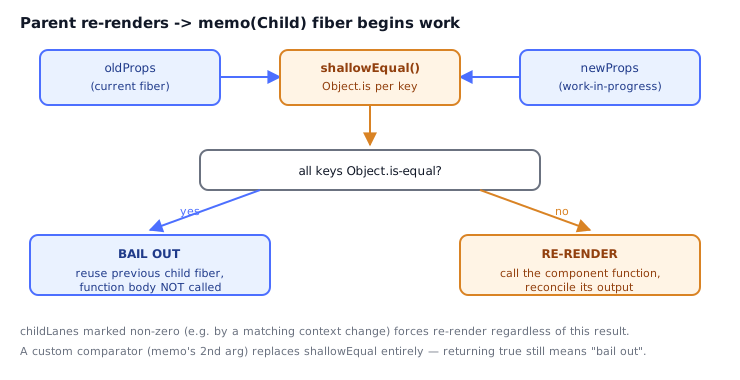
memo's default comparator is not a deep equal — it's shallowEqual, which does exactly this:
function shallowEqual(objA, objB) {
  if (Object.is(objA, objB)) return true;
  if (typeof objA !== "object" || objA === null) return false;
  if (typeof objB !== "object" || objB === null) return false;
  const keysA = Object.keys(objA);
  const keysB = Object.keys(objB);
  if (keysA.length !== keysB.length) return false;
  for (const key of keysA) {
    if (!Object.is(objA[key], objB[key])) return false;
  }
  return true;
}
This runs on the fiber during beginWork for a memo-type fiber: React reads oldProps from the current (already-committed) fiber and newProps from the pending work, runs the comparator, and if it returns true, React bails out — it clones the child fiber subtree from the previous commit instead of calling the function again. Two things this makes precise:
- One level deep only. A
userobject with an unchangedidbut a mutatedpreferencesobject nested inside it passes the default shallow comparison becauseObject.is(oldUser, newUser)already short-circuitstruewhen the reference itself didn't change — but if a newuserobject is passed with onlypreferencesdifferent,shallowEqualcorrectly returnsfalsebecauseuseritself is a top-level key. The pitfall is the other direction: a prop that is itself a nested object whose leaf value changed while a wrapper stayed structurally similar can still slip through a custom comparator that doesn't check deep enough. memocannot stop context propagation. As covered in topic 01 Section 3,propagateContextChangesetschildLaneson every ancestor of a matching consumer, and a memo fiber with non-zerochildLanesis not allowed to bail out even if its shallow prop comparison passes — React must still descend through it.memoonly protects against parent re-renders via props; it does nothing against context or the component's own state.
⚠️ Common Pitfalls
- Wrapping every component in
memo"for safety." The comparison itself costs a pass over every prop, every render, whether or not it ever helps — blanketmemousage without profiling evidence commonly makes an app slower. memoaround a component whose parent always passes new object/function props. The comparison always fails, somemoadds a wasted comparison on top of the render it couldn't prevent — pair it withuseMemo/useCallbackat the prop's source, per Section 4.- Forgetting
memodoes nothing against context. Amemo-wrapped consumer still re-renders on every provider value change (Section 6) — the fix is splitting contexts or a selector-based store, not morememo. - Returning the comparator's boolean backwards.
memo's custom comparator returnstrueto SKIP a render (props "equal") — the opposite of a typicalequals(a, b)utility's intuitive "true means different" framing bugs people expect. - Optimizing components the Profiler didn't flag. Time spent memoizing a component that renders in under a millisecond and rarely re-renders is time not spent on the one that actually causes jank.
- Passing
childrenas JSX and expectingmemoto catch it.<Wrapper><Child /></Wrapper>creates a newchildrenelement (and thus a new prop value) on every parent render unless the JSX itself is hoisted or the element reference is otherwise stabilized — this is a common "why doesn't memo work here" report.
📋 Quick Reference
| Tool | Protects against | Does NOT protect against |
|---|---|---|
React.memo | Re-render caused by unchanged props on parent re-render | Own state change, context change, non-memoized prop sources |
useCallback | New function identity breaking memo/useMemo/useEffect deps | Anything if the memoized child isn't itself wrapped in memo |
useMemo | Recomputing an expensive value on every render | Anything if nothing downstream depends on referential stability |
Custom memo comparator | False negatives from objects with irrelevant changing fields | Bugs from the inverted true-means-skip boolean convention |
| Step | Tool |
|---|---|
| Find what's actually slow | React DevTools Profiler, record + inspect "why did this render" |
| Stop a child re-rendering on unrelated parent renders | memo |
| Make a function/object prop worth comparing | useCallback / useMemo at the source |
| Stop re-renders driven by context, not props | Split contexts or selector-based store (topic 01, Section 7) |
Continuation of Part 1. This part covers reducing how much work ships to the browser (code splitting) and how much DOM exists at once (virtualization), then the concurrent APIs that let React deprioritize work instead of doing less of it.
1Code Splitting with lazy + Suspense
Every component imported at the top of a bundle ships in the initial JavaScript payload, whether or not it's ever rendered on first paint. React.lazy defers a component's module (and everything it imports) into a separate chunk, fetched only when first rendered:
import { lazy, Suspense } from "react";

const SettingsPanel = lazy(() => import("./SettingsPanel"));

function App() {
  const [showSettings, setShowSettings] = useState(false);
  return (
    <>
      <button onClick={() => setShowSettings(true)}>Settings</button>
      {showSettings && (
        <Suspense fallback={<Spinner />}>
          <SettingsPanel />
        </Suspense>
      )}
    </>
  );
}
import("./SettingsPanel") is a dynamic import — bundlers (Webpack, Vite, Turbopack) treat it as a split-point boundary and emit a separate chunk file. lazy wraps the promise it returns so that rendering <SettingsPanel /> before the chunk loads throws the promise, which the nearest Suspense boundary catches to show fallback until it resolves. This is the same throw-a-promise mechanism Server Components' Suspense integration uses (frontend/ecosystem/03-nextjs_server_components), just triggered by a network fetch for JS instead of data.
2Route-Level and Component-Level Splitting
The highest-value split points are ones a user doesn't visit every session — a settings modal, an admin-only route, a rich text editor. Splitting a component that renders unconditionally near the top of the tree provides no benefit; it downloads immediately anyway, just as a separate network request instead of inline in the main bundle (and pays extra round-trip latency for nothing).
3List Virtualization
Rendering 10,000 DOM nodes for a 10,000-row list is slow regardless of how well-memoized each row is — the browser still has to lay out and paint every one. Virtualization renders only the rows currently visible in the scroll viewport (plus a small overscan buffer), keeping the DOM node count constant regardless of list length:
function VirtualList({ items, rowHeight, viewportHeight }: { items: Item[]; rowHeight: number; viewportHeight: number }) {
  const [scrollTop, setScrollTop] = useState(0);
  const startIndex = Math.floor(scrollTop / rowHeight);
  const visibleCount = Math.ceil(viewportHeight / rowHeight) + 1; // +1 overscan row
  const endIndex = Math.min(items.length, startIndex + visibleCount);

  return (
    <div style={{ height: viewportHeight, overflow: "auto" }} onScroll={(e) => setScrollTop(e.currentTarget.scrollTop)}>
      <div style={{ height: items.length * rowHeight, position: "relative" }}>
        {items.slice(startIndex, endIndex).map((item, i) => (
          <div key={item.id} style={{ position: "absolute", top: (startIndex + i) * rowHeight, height: rowHeight }}>
            {item.label}
          </div>
        ))}
      </div>
    </div>
  );
}
The outer scrollable div reports its real height (items.length * rowHeight) so the scrollbar behaves correctly, while only the rows within the viewport are ever mounted — an onScroll handler recomputes which slice is visible and React reconciles just that slice. Libraries like @tanstack/react-virtual and react-window implement this same core idea with variable-height support, horizontal lists, and better scroll performance than a naive onScroll handler.
4useTransition: Marking Updates as Low Priority
startTransition tells React that a state update is not urgent — it can be interrupted by, and should yield to, more urgent updates like the keystroke that triggered it:
function SearchPage() {
  const [query, setQuery] = useState("");
  const [results, setResults] = useState<Item[]>([]);
  const [isPending, startTransition] = useTransition();

  function handleChange(e: React.ChangeEvent<HTMLInputElement>) {
    setQuery(e.target.value); // urgent — the input must feel instant
    startTransition(() => {
      setResults(filterHugeList(e.target.value)); // expensive — can wait
    });
  }

  return (
    <>
      <input value={query} onChange={handleChange} />
      {isPending && <span>Updating…</span>}
      <ResultsList results={results} />
    </>
  );
}
Without startTransition, a single keystroke would synchronously run filterHugeList before the browser can paint the updated input value, making typing feel laggy on a large dataset. With it, the input update commits immediately in its own (default-priority) render pass, while the results update is processed in a low-priority lane that React works on in the background and can abandon mid-render if a newer keystroke arrives.
5useDeferredValue: Deferring a Value Instead of a Setter
useDeferredValue achieves a similar effect without wrapping the state setter itself — useful when you don't own the code that calls setState (e.g., a value from a parent or a form library):
function SearchPage({ query }: { query: string }) {
  const deferredQuery = useDeferredValue(query);
  const results = useMemo(() => filterHugeList(deferredQuery), [deferredQuery]);
  const isStale = query !== deferredQuery;

  return (
    <div style={{ opacity: isStale ? 0.6 : 1 }}>
      <ResultsList results={results} />
    </div>
  );
}
deferredQuery initially equals query, but when query changes rapidly, React keeps rendering deferredQuery at its previous value in a low-priority background render, only updating it once things settle — comparing query !== deferredQuery is the standard way to show a stale-content indicator during that window.
Under the HoodHow a Transition Actually Yields▾
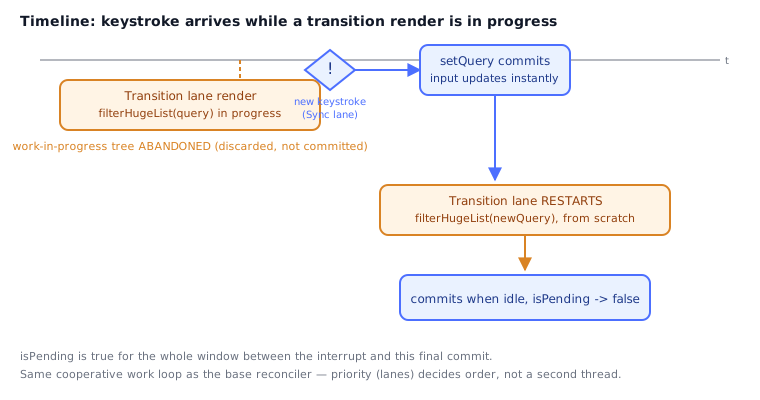
frontend/react/core/04-rendering_and_reconciliation (Part 2) established that React's work loop checks shouldYieldToBrowser() after every fiber and that lanes is the priority bitmask driving what gets worked on next. startTransition and useDeferredValue are built directly on that mechanism:
- Code inside
startTransition's callback has its resulting updates tagged with the Transition lane instead of the default Sync/InputContinuous lane a plainsetStategets. - When React's scheduler has both a Transition-lane render in progress and a new Sync-lane update arrives (the next keystroke), it does not finish the low-priority work first — it abandons the in-progress work-in-progress tree for the transition, processes the urgent update to completion and commits it, and then restarts the transition's render from scratch, now starting from the newer committed state.
- This is why transition work must be a pure function of state, with no side effects that assume "runs to completion" — a partially-rendered, then-discarded work-in-progress tree is a normal, expected occurrence for transition-lane work, not a bug.
isPending(fromuseTransition) and thequery !== deferredQuerystaleness check (fromuseDeferredValue) both work the same way under the hood: they read whether a lower-priority render tagged against that state is still outstanding.
None of this changes single-threaded JavaScript into multi-threaded work — it is cooperative scheduling within one thread, using the same time-slicing (shouldYieldToBrowser, roughly a 5ms budget) already described in the reconciliation topic. The gain is entirely about ordering: urgent work is allowed to cut in line ahead of expensive work that was already in flight.
⚠️ Common Pitfalls
- Wrapping the urgent update itself in
startTransition.startTransition(() => setQuery(value))makes the input's own display lag, defeating the entire point — only the expensive derived update belongs inside the transition; the input's own state stays a normalsetState. - Virtualizing a short list. Virtualization's bookkeeping (tracking
scrollTop, computing visible ranges, absolute positioning) costs more than it saves below roughly a few hundred rows — profile first, same asmemo. - Splitting a component that always renders on first paint. The network round-trip for that chunk delays the very content the split was supposed to speed up; only split what's conditional or below the fold.
- Expecting
useDeferredValueto debounce. It has no timer — it's tied to React's scheduling, not to elapsed time, so it does not skip intermediate values the way asetTimeout-based debounce does; it can still re-render on every keystroke if the machine is fast enough to keep up. - Assuming
startTransitionmakes the wrapped work faster. It doesn't reduce the actual computation —filterHugeListstill takes exactly as long; the benefit is entirely about not blocking urgent updates while it runs. - Forgetting virtualized rows need a stable, item-identity
key. Reusing array index askeyhere interacts badly with absolute positioning during fast scrolling — reuse the guidance fromfrontend/react/core/04-rendering_and_reconciliationonkeychoice.
📋 Quick Reference
| Problem | Tool |
|---|---|
| Large JS bundle, most of it unused on first paint | React.lazy + Suspense, split at route/rarely-used-component boundaries |
| Thousands of DOM nodes for a long list | Virtualization (render only the visible slice) |
| Typing feels laggy because of an expensive derived update | useTransition around the expensive setState |
| Expensive re-render driven by a prop/value you don't control the setter for | useDeferredValue |
| Need to know if a low-priority update is still pending | isPending (from useTransition) or value !== deferredValue |
| Mechanism | Fact |
|---|---|
lazy | Dynamic import() becomes a bundler split point; throws a promise Suspense catches |
| Virtualization | DOM node count stays O(viewport), not O(list length) |
| Transition lane | A separate priority bitmask from default setState's lane |
| Interruption | An urgent Sync-lane update discards and later restarts an in-flight Transition-lane render |
| Underlying primitive | Same cooperative time-slicing (shouldYieldToBrowser) as the base work loop |
This closes out frontend/react/advanced. frontend/ecosystem builds the surrounding toolchain — routing, styling, and state libraries — on top of these primitives.
🧠 Key takeaways
- Profile first (React DevTools Profiler, Performance panel); re-renders aren't bad, slow ones are.
memoskips re-rendering when props are shallow-equal; pair with useMemo/useCallback for stable props.- Code-split routes and heavy components with
lazy+Suspense. - Virtualize long lists; use
useTransition/useDeferredValueto keep input responsive.
🎤 Interview Q&A
Q1How do you approach React performance problems?core▾
Measure with React DevTools Profiler and browser performance tools, identify slow renders or expensive commits, then fix: colocate state, split components, memoize, virtualize long lists, lazy-load code, and defer non-urgent updates.
- Which Web Vitals matter? LCP, INP (responsiveness), CLS.
Q2How do you render very long lists efficiently?core▾
Virtualization (react-window, TanStack Virtual) renders only visible rows; also paginate or use infinite loading, with stable keys.
- Why does it help? DOM size and render work stay constant.
Q3How do you reduce bundle size?core▾
Code splitting with React.lazy/dynamic imports per route and heavy components, tree-shaking, avoiding large dependencies, analyzing bundles, and server components that ship no JS.
- Tool? Bundle analyzers (webpack-bundle-analyzer, source-map-explorer).
Q4What are transitions and useDeferredValue for?senior▾
Marking updates as non-urgent so React keeps urgent interactions (typing) responsive while rendering expensive updates (filtering a big list) in the background, interruptible.
- Difference? startTransition wraps the update; useDeferredValue defers a value you receive.
Q5What causes layout shift and how do you prevent it?core▾
Images/ads/fonts loading without reserved space, or content inserted above existing content. Set width/height or aspect-ratio, reserve space for dynamic content, and use font-display strategies.
- Metric? CLS (Cumulative Layout Shift).
🛠️ Practice exercises
Each exercise is a file in this topic folder. Code exercises are self-checking: run them and make the checks pass.
✅ Check yourself
Answer the questions — feedback is instant.