State Management Patterns
Most state problems are placement problems. Use the decision helper to decide where a piece of state should live, then apply lifting, reducers, derived state and state machines, and see how React batches updates.
🎯 What you'll learn
- Colocate by default
- Lifting state up and the real cost of prop drilling
- Reducer-per-feature and derived state
- State machines and batching internals
📚 Before you start
Prerequisite: frontend/react/hooks/01-usestate, 04-usereducer, and frontend/react/advanced/01-context_api_in_depth. This topic is not about a library — it's about the decision process for where state should live and how it should be shaped, before you ever reach for Redux or Zustand (frontend/ecosystem/10-redux, 12-zustand).
1Colocate by Default
The single highest-leverage rule: state lives as close as possible to where it's used, and moves up only when a sibling actually needs it.
// BAD: hoisted to the top for no reason — App re-renders on every keystroke
function App() {
  const [query, setQuery] = useState("");
  return (
    <>
      <SearchBox query={query} onChange={setQuery} />
      <StaticFooter /> {/* re-renders on every keystroke too, for nothing */}
    </>
  );
}

// GOOD: colocated — only SearchBox's subtree re-renders
function App() {
  return (
    <>
      <SearchBox />
      <StaticFooter />
    </>
  );
}
function SearchBox() {
  const [query, setQuery] = useState("");
  return <input value={query} onChange={(e) => setQuery(e.target.value)} />;
}
Every useState call re-renders the component that owns it (and its subtree, absent memoization). Placing state one level higher than necessary drags unrelated siblings into that re-render for free — see frontend/react/advanced/03-performance_optimization for measuring this.
2Lifting State Up
State moves up exactly one level: to the nearest common ancestor of the components that need to share it — no further.
function FilterableList() {
  const [filter, setFilter] = useState(""); // lifted here because BOTH children need it
  return (
    <>
      <FilterInput value={filter} onChange={setFilter} />
      <ItemList filter={filter} />
    </>
  );
}
"Lift to the common ancestor" is a ceiling, not a default — lifting further than that ancestor (e.g., all the way to App) reintroduces the colocation problem from Section 1 for no benefit.
3Prop Drilling and Its Real Cost
Passing a prop through components that don't use it, just to reach one that does, is prop drilling. It is not free, but the cost is often mischaracterized:
function Page({ user }: { user: User }) {
  return <Layout user={user} />; // Layout doesn't use `user`
}
function Layout({ user }: { user: User }) {
  return <Sidebar user={user} />; // Sidebar doesn't use `user` either
}
function Sidebar({ user }: { user: User }) {
  return <Avatar user={user} />; // finally used here
}
The real costs are maintenance (every intermediate component's signature must change when the shape changes) and coupling (Layout and Sidebar now mention User even though they don't care about it) — not rendering performance. Layout re-rendering because user changed is no different, performance-wise, from Layout re-rendering for its own reasons. Reach for context (Section 4, and the full mechanism in topic 01) when the drilling depth or the number of intermediate components makes the maintenance cost outweigh context's re-render tradeoffs — not automatically at the first sign of drilling.
4Reducer-Per-Feature
When several pieces of state change together in response to the same events, a useReducer with a discriminated-union action type keeps the transitions in one auditable place instead of scattered across several setState calls that must always be called together.
type FormState = { values: Record<string, string>; errors: Record<string, string>; submitting: boolean };
type FormAction =
  | { type: "change"; field: string; value: string }
  | { type: "submitStart" }
  | { type: "submitError"; field: string; message: string }
  | { type: "submitSuccess" };

function formReducer(state: FormState, action: FormAction): FormState {
  switch (action.type) {
    case "change":
      return { ...state, values: { ...state.values, [action.field]: action.value } };
    case "submitStart":
      return { ...state, submitting: true, errors: {} };
    case "submitError":
      return { ...state, submitting: false, errors: { ...state.errors, [action.field]: action.message } };
    case "submitSuccess":
      return { ...state, submitting: false };
  }
}
Three separate useState calls (values, errors, submitting) can drift out of sync — e.g., a bug path that sets submitting: false but forgets to clear errors. A reducer makes every valid transition an explicit, testable case, and the switch is exhaustive-checkable by TypeScript when FormAction is a closed union.
5Derived State: Compute, Don't Store
A recurring bug source is storing a value that is fully computable from other state, then forgetting to update it when the source changes.
// BAD: fullName is redundant state that can go stale
const [firstName, setFirstName] = useState("Ada");
const [lastName, setLastName] = useState("Lovelace");
const [fullName, setFullName] = useState("Ada Lovelace"); // must be kept in sync manually

// GOOD: derive it during render — impossible to go stale
const [firstName, setFirstName] = useState("Ada");
const [lastName, setLastName] = useState("Lovelace");
const fullName = `${firstName} ${lastName}`; // recomputed every render, always correct
The rule of thumb: if a value can be computed from existing state and props with a pure function, it is not state — it's a render-time calculation. Wrap it in useMemo only after profiling shows the computation itself is expensive (frontend/react/hooks/06-usememo); useMemo does not change correctness here, only avoids recomputation cost.
6State Machines for Impossible States
A handful of independent booleans can represent combinations that make no sense (isLoading: true, isError: true at the same time). A discriminated union collapses the state space to only the combinations that are actually valid.
// BAD: 2^3 = 8 possible boolean combinations, most of them nonsensical
interface BadState { isLoading: boolean; isError: boolean; data: Data | null }

// GOOD: exactly the valid states, and TypeScript enforces exhaustive handling
type FetchState =
  | { status: "idle" }
  | { status: "loading" }
  | { status: "success"; data: Data }
  | { status: "error"; message: string };

function render(state: FetchState) {
  switch (state.status) {
    case "idle": return "Waiting to start";
    case "loading": return "Loading...";
    case "success": return state.data; // TS knows `data` exists ONLY here
    case "error": return state.message; // TS knows `message` exists ONLY here
  }
}
state.data is inaccessible outside the "success" branch and state.message outside "error" — the type system, not a runtime check, prevents rendering a spinner and an error message from the same render.
Under the HoodBatching and the Update Queue▾
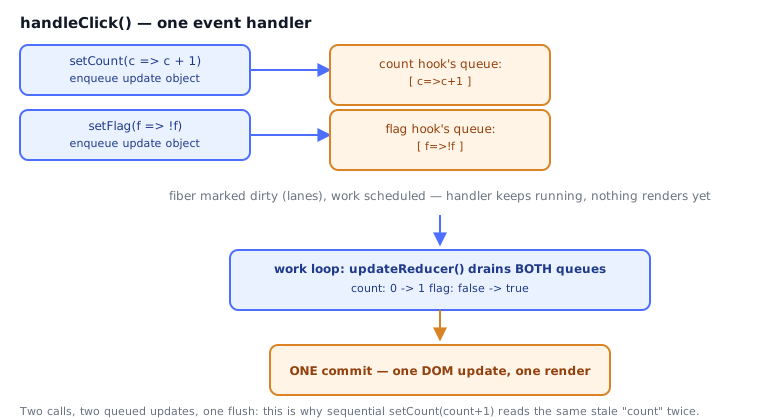
When an event handler calls setState twice, React does not re-render twice:
function Counter() {
  const [count, setCount] = useState(0);
  const [flag, setFlag] = useState(false);
  function handleClick() {
    setCount((c) => c + 1); // enqueued
    setFlag((f) => !f);     // enqueued
    // still only ONE re-render after this handler returns
  }
  return <button onClick={handleClick}>{count}</button>;
}
Each setState call appends an update object ({ action, next, eagerState }) to that hook's own circular update queue on the fiber — it does not synchronously mutate count or trigger a render. React marks the fiber (and its ancestors, via lanes/childLanes exactly as in topic 01's propagation) as having pending work and schedules a single work loop pass. Inside that pass, updateReducer walks each hook's queue in order, applying every pending action to compute the final memoizedState, and only then commits one DOM update. This is why setCount(count + 1); setCount(count + 1) inside one handler produces +1, not +2 — both updates close over the same stale count read at call time — while the functional form setCount(c => c + 1) reads the previous update's result off the queue rather than the stale closure, and correctly produces +2. Batching used to be limited to React event handlers before React 18; since 18, flushSync is the escape hatch to force a synchronous, unbatched render when interop code needs the DOM updated immediately.
This is also the underlying reason context (identity-based, whole-value propagation) and external stores (subscription + selector, described in frontend/ecosystem/10-redux and 12-zustand) feel different but are both built on the same primitive: something marks a fiber's lanes dirty, and the work loop decides what to re-render from there.
⚠️ Common Pitfalls
- Lifting state to the root "just in case." Every level between the state and its farthest consumer re-renders on every change even if nothing in between reads it — the fix is lifting only to the actual common ancestor (Section 2), not to
App. - Storing derived values instead of computing them. Two pieces of state that must be kept manually in sync (Section 5) will eventually be updated in the wrong order or only one will be updated — computed values can't go stale because there's nothing to forget to update.
- Independent booleans that model dependent state.
isLoading/isError/hasDataas three separateuseStatecalls allow simultaneoustrue/true/true, a state your UI was never designed to render — collapse them into one discriminated union (Section 6). - Splitting one logical update across multiple
setStatecalls that read stale closures.setX(x + 1); setY(x + 1)inside the same handler uses the same stalexfor both — reach for the functional updater form or, better, a single reducer action that updates both fields from one piece of logic. - Reaching for a reducer before there's more than one transition. A reducer with a single action type is strictly more code than the equivalent
useStatefor no benefit — introduce it when a second related action type shows up, not preemptively. - Mistaking prop drilling depth for a rendering problem. Passing an unused prop through three components costs a few extra lines of typing, not three extra re-renders that wouldn't have happened anyway (Section 3) — don't reach for context purely to shorten a prop chain that isn't otherwise a re-render bottleneck.
📋 Quick Reference
| Situation | Pattern |
|---|---|
| State used by one component | Colocated useState in that component |
| State used by a few siblings | Lift to their nearest common ancestor |
| State used by many components across the tree | Context (see topic 01) or external store |
| Several fields that always change together | useReducer with a discriminated-union action type |
| A value fully computable from other state/props | Compute during render, don't store it |
| A handful of dependent booleans | Discriminated union modeling only the valid states |
Batching several setState calls in one handler | Automatic since React 18; use functional updaters for sequential math |
| Need a synchronous, unbatched render | flushSync (rare — interop escape hatch) |
Next: frontend/react/advanced/03-performance_optimization covers measuring and fixing the re-render costs these placement decisions create.
🧠 Key takeaways
- Colocate state as close as possible to where it's used; lift only when sharing requires it.
- Separate server state (cache it with a library) from UI state; put shareable UI state in the URL.
- Derive instead of duplicating; use reducers/state machines to eliminate impossible states.
- Context for rarely-changing globals; external stores for frequently-changing shared state.
🎤 Interview Q&A
Q1How do you categorize state in a React app?core▾
Local UI state (inputs, toggles), shared client state (cart, filters), server state (fetched data with caching and sync), URL state (search params, route), and form state. Each has the right tool.
- Most common mistake? Putting server state into Redux by hand.
Q2Why use a server-state library like TanStack Query?core▾
It handles caching, deduplication, background refetching, stale-while-revalidate, pagination, retries, mutations with invalidation and optimistic updates, removing lots of custom code.
- What's staleTime? How long data is considered fresh before refetching.
Q3When do you need a global store?core▾
When many distant components read and update the same client state frequently and you need devtools, middleware, or predictable patterns. Otherwise lift state or use context.
- Options? Redux Toolkit, Zustand, Jotai, MobX.
Q4Why put state in the URL?senior▾
Filters, pagination and selected tabs in search params make views shareable, bookmarkable, and survive reloads and back/forward navigation.
- Tools? React Router's useSearchParams, nuqs for Next.js.
Q5How do you avoid unnecessary re-renders with global stores?core▾
Subscribe with fine-grained selectors, keep selectors returning stable references (shallow equality), normalize data, and split stores/slices.
- Redux selector memoization? createSelector (Reselect).
🛠️ Practice exercises
Each exercise is a file in this topic folder. Code exercises are self-checking: run them and make the checks pass.
✅ Check yourself
Answer the questions — feedback is instant.