useLayoutEffect
useLayoutEffect runs after the DOM updates but before the browser paints. Watch a tooltip flicker when it's positioned in useEffect and render correctly when measured in useLayoutEffect, and learn why useEffect stays the default.
🎯 What you'll learn
- Same signature, different timing
- Timing comparison
- Measure, then adjust
- Defaulting to useEffect and the SSR note
📚 Before you start
1Same Signature, Different Timing
useLayoutEffect has the exact same signature as useEffect — a callback that can return a cleanup function, plus a dependency array — but React runs it at a different point in the render cycle: synchronously, after DOM mutations are committed, but before the browser paints the screen.
import { useLayoutEffect, useRef, useState } from "react";

function Measured() {
  const boxRef = useRef<HTMLDivElement>(null);
  const [width, setWidth] = useState(0);

  useLayoutEffect(() => {
    const rect = boxRef.current!.getBoundingClientRect();
    setWidth(rect.width); // read the DOM, then update state — BEFORE the user sees anything
  }, []);

  return <div ref={boxRef}>Measured width: {width}px</div>;
}
Because the measurement and the resulting state update both happen before paint, the user never sees an intermediate "0px" frame — the DOM read and the visual correction are invisible to them.
2Timing Comparison
useEffect | useLayoutEffect | |
|---|---|---|
| Runs relative to paint | After the browser paints (asynchronous) | Before the browser paints (synchronous) |
| Blocks the browser? | No | Yes, until the effect (and its cleanup) finish |
| Risk | A visible flash of stale UI if the effect changes visible output | Jank / dropped frames if the effect is slow |
| Default choice | Yes — use this unless you have a specific reason not to | No — opt in only when needed |
Commit → Paint → useEffect runs        (a flash CAN happen between commit and the fix)
Commit → useLayoutEffect runs → Paint   (no flash possible — fix happens before paint)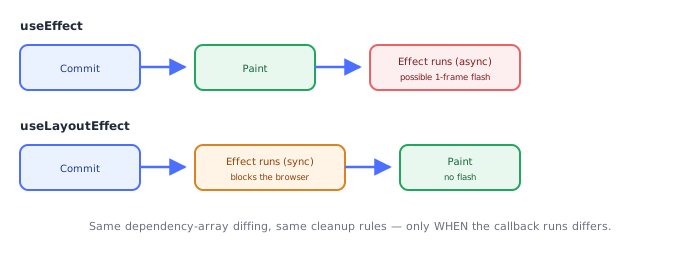
3The Canonical Use Case: Measure, Then Adjust
Any pattern that reads a DOM node's actual rendered geometry and then immediately uses that to change what's on screen is the textbook case for useLayoutEffect:
function Tooltip({ anchorRef, children }: { anchorRef: React.RefObject<HTMLElement>; children: React.ReactNode }) {
  const tooltipRef = useRef<HTMLDivElement>(null);
  const [style, setStyle] = useState<React.CSSProperties>({ visibility: "hidden" });

  useLayoutEffect(() => {
    const anchorRect = anchorRef.current!.getBoundingClientRect();
    const tooltipRect = tooltipRef.current!.getBoundingClientRect();

    // flip above the anchor if there isn't room below, so it never renders off-screen
    const top =
      anchorRect.bottom + tooltipRect.height > window.innerHeight
        ? anchorRect.top - tooltipRect.height
        : anchorRect.bottom;

    setStyle({ position: "fixed", top, left: anchorRect.left, visibility: "visible" });
  }, [anchorRef]);

  return <div ref={tooltipRef} style={style}>{children}</div>;
}
Tooltip/popover repositioning, animation start-position setup, and scroll-position restoration all share this shape: read layout → compute → write layout, all before the user's eyes get a chance to see the "wrong" intermediate frame.
4Default to useEffect
Most effects — data fetching, subscriptions, logging, timers — have no visual synchronization requirement at all, and blocking paint for them only hurts perceived performance for no benefit. The rule: start with useEffect; switch to useLayoutEffect only if you can point to an actual visible flicker it fixes. If nothing on screen depends on the effect's DOM read, there's nothing for useLayoutEffect to protect against.
5Server Rendering Note
useLayoutEffect does nothing meaningful without a real browser DOM and a paint cycle — during server rendering there is no paint to run before. React prints a console warning if useLayoutEffect executes during SSR. The common fallback is to keep the effect as useEffect for any code path that might run on the server, or gate the layout-dependent logic so it only runs client-side (a pattern the Next.js ecosystem topics cover in depth — this is just the constraint to be aware of here).
Under the HoodHow it works internally▾
React does not attach state to the component function — a function component is just a function, called fresh every render with no persistent this and no memory of its own. Hook data has to live somewhere else: it lives on the fiber, React's internal object representing one component instance in the tree.
Each fiber holds a memoizedState pointer to the head of a singly linked list of hook objects, one node per hook call, built in the exact order those hooks are called. Every render, React walks this list from the head, one node per hook call, in lockstep with your function body executing top to bottom. Matching is done purely by call order — not by variable name, not by any key. This is the entire reason the Rules of Hooks forbid conditional hook calls: wrap a hook in an if and, on some render, every hook call after it shifts one slot in the walk — silently reading and writing the wrong hook's stored data.
A useLayoutEffect hook node stores exactly the same two things a useEffect node does — the dependency array from the last run, and the cleanup function it returned — and uses the identical Object.is-per-element dependency diffing to decide whether to re-run. The entire difference between the two hooks is which effect list, and which scheduling phase, the fiber tags the work for. useEffect's callback is tagged for the passive effects phase, flushed asynchronously after the browser has already painted. useLayoutEffect's callback is tagged for the layout effects phase, flushed synchronously immediately after React commits DOM mutations but strictly before the browser gets a chance to paint those mutations.
Practically: the browser cannot paint until React's synchronous commit-phase work — including every layout effect and its cleanup — finishes running. That is exactly why a layout effect that measures the DOM and then synchronously calls a state setter never produces a visible flash: the setter's resulting re-render and re-commit both happen before the first paint occurs at all, not after it. It is also exactly why a slow layout effect is directly on the critical path to the next paint — the browser is blocked waiting on it — whereas a slow passive effect only delays other passive work, never the paint itself.
⚠️ Common Pitfalls
- Reaching for
useLayoutEffect"to be safe" by default — it blocks paint for effects (data fetching, subscriptions, logging) that have no visual synchronization need at all, hurting perceived performance for nothing in return. - Putting expensive computation inside a layout effect — since it runs synchronously before every paint, a slow layout effect causes direct, visible jank; expensive work belongs in
useEffect(or memoized outside the effect entirely) unless it truly must finish before paint. - Using it in code that might run during server rendering — there's no paint cycle on the server, so React emits a console warning; guard layout-dependent logic to client-only execution instead.
- Forgetting the cleanup rules are identical to
useEffect— the cleanup function runs before the next execution and on unmount, following the same dependency-diffing rules;useLayoutEffectdoesn't change any of that, only the timing of when the effect body itself runs.
📋 Quick Reference
useLayoutEffect(() => { ...; return cleanup; }, [deps])   → same API shape as useEffect

Commit → Paint → useEffect runs           → async, after paint, can flash
Commit → useLayoutEffect runs → Paint      → sync, before paint, no flash, can block

Default: useEffect
Switch to useLayoutEffect only for: DOM measure-then-adjust that would otherwise flicker
🧠 Key takeaways
- Same API as useEffect, but runs synchronously after DOM mutation, before paint.
- Use it to measure layout and adjust before the user sees a frame (tooltips, popovers, scroll restore).
- It blocks painting: default to
useEffectfor everything else. - It doesn't run on the server; guard or use
useEffectfor SSR-rendered components.
🎤 Interview Q&A
Q1How does useLayoutEffect differ from useEffect?core▾
useLayoutEffect runs synchronously after DOM mutations but before the browser paints; useEffect runs after paint. Layout effects block painting, so use them only when necessary.
- Typical use? Measuring DOM size/position and adjusting before the user sees it.
Q2Give an example where useLayoutEffect prevents flicker.core▾
Positioning a tooltip: render it, measure its size with getBoundingClientRect in a layout effect, then set the final position before paint, avoiding a visible jump.
- Without it? The tooltip briefly appears in the wrong place.
Q3What happens with useLayoutEffect during SSR?core▾
It doesn't run on the server and React warns; use useEffect, or a useIsomorphicLayoutEffect that picks the right hook per environment.
- Why doesn't it run? There's no DOM layout on the server.
Q4What are the performance implications?senior▾
Long work in layout effects delays paint and hurts responsiveness; state updates inside them trigger synchronous re-renders before paint.
- What's useInsertionEffect? Runs before layout effects, meant for CSS-in-JS libraries to inject styles.
Q5When should you not use it?core▾
For data fetching, subscriptions or anything not related to layout; default to useEffect.
- Rule of thumb? Only when you see flicker you need to fix.
🛠️ Practice exercises
Each exercise is a file in this topic folder. Code exercises are self-checking: run them and make the checks pass.
✅ Check yourself
Answer the questions — feedback is instant.