useActionState
useActionState wires a form to an async action and keeps the action's latest result as state, with a pending flag. Follow a sign-up submission that returns validation errors, then succeeds, without any extra useState.
🎯 What you'll learn
- The problem it solves
- The basic API
- Why the action receives previousState first
- Validation errors, calling outside a form, and useFormStatus
📚 Before you start
1The Problem It Solves
Handling a form submission that hits the network traditionally means wiring up pending, error, and result state by hand, and manually calling preventDefault before doing async work:
// Without useActionState: three separate pieces of state, wired by hand
function ContactForm() {
  const [pending, setPending] = useState(false);
  const [message, setMessage] = useState<string | null>(null);

  async function handleSubmit(e: React.FormEvent<HTMLFormElement>) {
    e.preventDefault();
    setPending(true);
    const formData = new FormData(e.currentTarget);
    const result = await submitContact(formData);
    setMessage(result);
    setPending(false);
  }

  return (
    <form onSubmit={handleSubmit}>
      <input name="email" />
      <button disabled={pending}>{pending ? "Sending..." : "Send"}</button>
      {message && <p>{message}</p>}
    </form>
  );
}
useActionState bundles "the latest result of an async action" and "whether it's currently in flight" into a single hook, and hands back a form-compatible action function that plugs directly into <form action={...}> — no manual preventDefault, no manual pending state.
2The Basic API
import { useActionState } from "react";

async function submitContact(previousState: string | null, formData: FormData) {
  await new Promise((resolve) => setTimeout(resolve, 1000)); // simulated network call
  const email = formData.get("email") as string;
  return `Thanks, we'll email you at ${email}!`;
}

function ContactForm() {
  const [message, formAction, isPending] = useActionState(submitContact, null);

  return (
    <form action={formAction}>
      <input name="email" type="email" />
      <button disabled={isPending}>{isPending ? "Sending..." : "Send"}</button>
      {message && <p>{message}</p>}
    </form>
  );
}
useActionState(actionFn, initialState) returns a 3-tuple: [state, formAction, isPending].
state— whateveractionFnmost recently returned (orinitialStatebefore the first submission).formAction— a wrapped version ofactionFnto pass to<form action={...}>(or call directly).isPending—truewhile the action is in flight.
Crucially, actionFn itself takes the previous state as its first argument, followed by the form data — that's the shape React requires so it can thread state from one submission to the next.
3Why the Action Signature Takes previousState First
// The action's signature is ALWAYS (previousState, formData) => newState
async function voteAction(previousState: number, formData: FormData): Promise<number> {
  const delta = formData.get("direction") === "up" ? 1 : -1;
  return previousState + delta; // builds on the last committed result
}

function VoteWidget() {
  const [votes, formAction] = useActionState(voteAction, 0);
  return (
    <form action={formAction}>
      <button name="direction" value="up">Upvote ({votes})</button>
    </form>
  );
}
This mirrors useReducer's (state, action) => newState shape deliberately — useActionState is conceptually "a reducer whose action is a form submission and whose reducer function is allowed to be async." Each submission's result becomes the input to the next submission's previousState, letting an action accumulate — a running total, a growing list of errors, an incrementing counter — without any extra state variables.
4Handling Validation Errors Without Extra State
Because the action's return value is the hook's state, validation/error results flow through the same channel as success results — no separate error state needed:
interface FormResult {
  success: boolean;
  message: string;
}

async function submitEmail(_prev: FormResult | null, formData: FormData): Promise<FormResult> {
  const email = formData.get("email") as string;
  if (!email.includes("@")) {
    return { success: false, message: "Please enter a valid email." };
  }
  await sendEmail(email);
  return { success: true, message: "Sent!" };
}

function EmailForm() {
  const [result, formAction, isPending] = useActionState(submitEmail, null);
  return (
    <form action={formAction}>
      <input name="email" />
      <button disabled={isPending}>Submit</button>
      {result && (
        <p style={{ color: result.success ? "green" : "red" }}>{result.message}</p>
      )}
    </form>
  );
}5Calling the Action Outside a <form>
formAction isn't restricted to <form action={...}> — it can be called directly (e.g. from a button's onClick, bound with extra arguments), which is useful when the "form" is really just a single button triggering a server mutation:
async function deleteItemAction(_prev: string | null, itemId: string) {
  await deleteItem(itemId);
  return `Deleted item ${itemId}`;
}

function DeleteButton({ itemId }: { itemId: string }) {
  const [status, deleteAction, isPending] = useActionState(deleteItemAction, null);
  return (
    <button onClick={() => deleteAction(itemId)} disabled={isPending}>
      {isPending ? "Deleting..." : "Delete"}
    </button>
  );
}
Note this variant's action takes whatever argument the caller passes as its second parameter — it need not be a FormData at all; FormData only appears automatically when formAction is wired to a real <form action={...}>.
6Composed With useFormStatus
A component nested inside the <form> can read the same in-flight status independently via useFormStatus (from react-dom), without isPending being threaded down as a prop — see the useFormStatus topic for the full picture of how the two hooks share the same underlying pending-transition tracking.
Under the HoodHow it works internally▾
React does not attach state to the component function — a function component is just a function, called fresh every render with no persistent memory of its own. Hook data lives on the fiber, in the same singly linked list of hook objects every other hook in this curriculum uses, walked in strict call order every render — which is why useActionState, like all hooks, cannot be called conditionally.
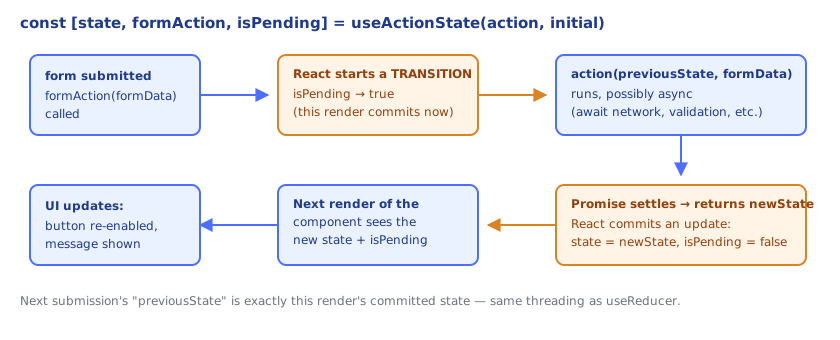
useActionState's hook node holds the current state value, much like a useState/useReducer node does. But dispatching the wrapped formAction doesn't just enqueue a plain update — React wraps the call in a transition, the same lower-priority scheduling mechanism that powers useTransition and Suspense-driven navigation. Concretely: calling formAction marks the pending action as a transition, flips this hook's isPending flag to true for the current render pass, invokes your action function (await-ing it if it's async), and — once the returned promise settles — schedules an update that writes the action's return value into this hook's state slot and flips isPending back to false. Because it's a transition, React can keep rendering the existing UI responsively while the action is in flight, rather than blocking on it.
This is also why the action's signature takes previousState first: React always calls your action function with whatever is currently sitting in this hook's state slot as the first argument, then commits the return value as the new state once it resolves — structurally identical to how useReducer always calls the reducer with the current state and an action payload, except here the "reducer" is your (possibly async) action function and the "action payload" is the form data (or whatever argument you pass when calling it directly).
useFormStatus, covered in the previous topic, is not a separate mechanism from this — it reads the same underlying pending-transition status React DOM associates with the ancestor <form>'s action, just from a different fiber (a descendant, via an upward tree walk) rather than from useActionState's own hook node on the fiber that called it.
⚠️ Common Pitfalls
- Forgetting the action's first parameter is
previousState, not the form data — the signature is always(previousState, formData) => newState; putting form data first silently breaks the state-threading contract. - Mutating
previousStatein place instead of returning a new value — exactly likeuseReducer, the action should be treated as pure with respect to its inputs, returning a new state value rather than mutating the old one. - Manually managing a separate
pending/errorstate alongsideuseActionState— defeats the purpose; let the action's return value carry error/result info, and readisPendingdirectly from the hook. - Calling
formActionand expecting a return value synchronously — the action runs as a transition; its result lands instateon a subsequent render, not as this call's return value. - Assuming
useActionStaterequires a real<form>—formActioncan be called directly (e.g., fromonClick) with any argument shape; theFormDataconvention only applies when wired to<form action={...}>.
📋 Quick Reference
const [state, formAction, isPending] = useActionState(actionFn, initialState)

actionFn: (previousState, formData) => newState   → newState may be a Promise
formAction  → pass to <form action={formAction}> OR call directly with any arg
isPending   → true while the action's transition is in flight

Error handling: return an error shape from actionFn instead of throwing;
                no separate error state needed — it's just part of `state`.
🧠 Key takeaways
useActionState(action, initialState)→[state, formAction, isPending].- The action receives (previousState, formData) and returns the next state.
- Return validation errors as state; no separate loading/error useState needed.
- Pair with
useFormStatusin child buttons; works with Server Actions and without JS (permalink option).
🎤 Interview Q&A
Q1What does useActionState do?core▾
In React 19, it manages state produced by an action (often a form action): const [state, formAction, isPending] = useActionState(action, initialState). The action receives the previous state and form data and returns the new state.
- Previous name? useFormState in React DOM canary.
Q2How does it work with Server Actions?core▾
Pass a server action to useActionState and the returned formAction to <form action={formAction}>; the form works even before JavaScript loads (progressive enhancement), and the returned state can carry validation errors or messages.
- What's progressive enhancement here? The form submits as a normal POST without JS.
Q3How do you show pending state and errors?core▾
Use the isPending value from the hook (or useFormStatus in child components) to disable buttons/show spinners, and return error details in the state object from the action.
- Where should validation happen? In the action on the server, with optional client checks for UX.
Q4How does it compare with handling submissions manually?senior▾
It removes boilerplate for pending/error/result state, integrates with transitions, and supports server actions and progressive enhancement; manual onSubmit handlers give full control but more code.
- Does it replace form libraries? Not entirely; complex client-side validation may still use react-hook-form.
Q5What does the action function signature look like?core▾
async function action(prevState, formData) { … return newState; }, where formData is a FormData object from the submitted form.
- Can actions be sequential? Yes; React queues actions dispatched from the same hook.
🛠️ Practice exercises
Each exercise is a file in this topic folder. Code exercises are self-checking: run them and make the checks pass.
✅ Check yourself
Answer the questions — feedback is instant.