useOptimistic
useOptimistic shows the expected result of an action immediately and reverts automatically if it fails. Watch a sent message appear instantly, then either settle on success or roll back on error.
🎯 What you'll learn
- The problem it solves
- The basic API
- Automatic reverting
- Calling inside a transition and composing with useActionState
📚 Before you start
1The Problem It Solves
When a user sends a chat message or likes a post, waiting for the server round-trip before showing the change makes the UI feel sluggish — the "correct" data is often extremely predictable, so showing it immediately (and quietly correcting course if the server disagrees) feels far more responsive:
// Without useOptimistic: the new message only appears once the network
// request resolves — a visible delay between clicking "Send" and seeing it
function ChatThread({ messages, sendMessage }: { messages: Message[]; sendMessage: (text: string) => Promise<void> }) {
  const [pending, setPending] = useState(false);

  async function handleSend(text: string) {
    setPending(true);
    await sendMessage(text); // messages only updates after this resolves
    setPending(false);
  }
  // ... the sent message is invisible until the round-trip completes
}
useOptimistic lets the UI display a predicted state immediately, while the real update is still in flight, and automatically reverts to the real data once the actual update lands (or fails).
2The Basic API
import { useOptimistic } from "react";

interface Message {
  id: string;
  text: string;
  sending?: boolean;
}

function ChatThread({ messages, sendMessage }: { messages: Message[]; sendMessage: (text: string) => Promise<void> }) {
  const [optimisticMessages, addOptimisticMessage] = useOptimistic(
    messages,
    (currentMessages, newText: string) => [
      ...currentMessages,
      { id: `temp-${Date.now()}`, text: newText, sending: true },
    ]
  );

  async function handleSend(formData: FormData) {
    const text = formData.get("text") as string;
    addOptimisticMessage(text); // shows immediately, before the network call
    await sendMessage(text);    // once this resolves, `messages` (the real
                                  // prop) updates and optimisticMessages
                                  // reverts to reflecting it
  }

  return (
    <form action={handleSend}>
      {optimisticMessages.map((m) => (
        <p key={m.id} style={{ opacity: m.sending ? 0.5 : 1 }}>{m.text}</p>
      ))}
      <input name="text" />
    </form>
  );
}
useOptimistic(actualState, updateFn) returns [optimisticState, addOptimistic]:
actualState— the real, confirmed state (usually a prop derived from server data).updateFn(currentState, optimisticValue) => newState— a pure function describing how to merge an optimistic guess into the current (possibly already-optimistic) state.optimisticState— what to render; equalsactualStatewhen nothing is pending, or the predicted merge while a transition is in flight.addOptimistic(value)— call this (inside a transition — typically inside a form action or another transition-wrapped handler) to apply the optimistic update immediately.
3It Automatically Reverts
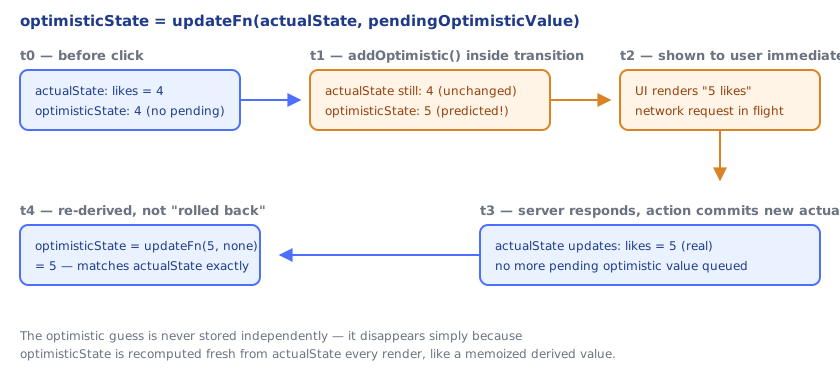
The optimistic value is never stored as its own independent state that a developer must remember to clear — it's derived fresh every render from actualState and whatever optimistic values are still pending:
// If sendMessage fails, don't manually "undo" the optimistic message —
// simply don't update `messages` with it. Once the pending transition
// settles, useOptimistic re-derives optimisticState from the real
// `messages` prop, and the temporary optimistic entry disappears on its own.
async function handleSend(formData: FormData) {
  const text = formData.get("text") as string;
  addOptimisticMessage(text);
  try {
    await sendMessage(text); // on success, caller re-fetches/updates `messages`
  } catch {
    showErrorToast("Message failed to send"); // no manual optimistic-state cleanup needed
  }
}
This is the core mental model: optimisticState is always a function of actualState plus in-flight guesses, never a separate mutable store — so there's nothing to "roll back" by hand.
4Must Be Called Inside a Transition
addOptimistic(value) only has an effect when called during a transition — inside a useActionState/form action, inside startTransition, or inside another hook that's already part of one. Calling it in a plain event handler outside any transition does nothing useful, because React needs a transition to know it should render the optimistic value first, then keep that render around while the real update resolves:
// CORRECT: inside a form action (which useActionState/form actions
// automatically wrap in a transition)
<form action={async (formData) => {
  addOptimisticMessage(formData.get("text") as string); // works — inside the action
  await sendMessage(formData.get("text") as string);
}}>

// Also correct: explicitly wrapped
function handleClick() {
  startTransition(() => {
    addOptimisticLike();
  });
}5Composed With useActionState
The two are frequently paired: useActionState manages the actual async submission and its result, while useOptimistic predicts what that result will look like before it arrives:
async function likePostAction(previousState: number, _formData: FormData) {
  await new Promise((r) => setTimeout(r, 800)); // network latency
  return previousState + 1; // the server-confirmed like count
}

function LikeButton({ initialLikes }: { initialLikes: number }) {
  const [likes, formAction] = useActionState(likePostAction, initialLikes);
  const [optimisticLikes, addOptimisticLike] = useOptimistic(likes, (current) => current + 1);

  return (
    <form action={async (formData) => {
      addOptimisticLike(undefined); // instantly shows likes + 1
      await formAction(formData);   // real update lands in `likes` once resolved
    }}>
      <button>{optimisticLikes} likes</button>
    </form>
  );
}
Under the HoodHow it works internally▾
React does not attach state to the component function — a function component is just a function, called fresh every render with no persistent memory of its own. Hook data lives on the fiber, in the same singly linked list of hook objects every hook in this curriculum uses, walked in strict call order every render.
useOptimistic's hook node tracks the passed-in actualState and a pending queue of optimistic updates, conceptually similar to how useState's node tracks a pending-update queue. What's different is when the optimistic value gets rendered versus committed: calling addOptimistic(value) inside a transition tells React "re-render right now, showing the result of updateFn(latestState, value), but treat this render as provisional." React shows that provisional render to the user immediately — this is what makes the UI feel instant — while the transition that triggered it (an async form action, typically) is still running in the background.
The "revert" behavior is not an undo operation React performs — it's a direct consequence of optimisticState being recomputed from scratch every render, as updateFn(actualState, pendingOptimisticValue), rather than being its own independently stored value. Once the transition's real async work resolves and updates actualState (by whatever mechanism the surrounding code uses — a useActionState result, a state setter, a re-fetch), the next render calls updateFn again with the new actualState. If there's no longer a pending optimistic value queued for that update, optimisticState simply equals actualState — the temporary guess evaporates because it was never persisted anywhere; it only existed as one render's derived output. This is exactly analogous to how useMemo's cached value is derived, not stored independently of its inputs — except here the "inputs" include a transient in-flight value tracked by the transition system, not just a dependency array.
This ties useOptimistic structurally to the same transition machinery useActionState and useTransition use: all three are built around React tracking "work that's allowed to keep the current UI interactive while something asynchronous resolves in the background," rather than the older model of a single synchronous state update per event.
⚠️ Common Pitfalls
- Calling
addOptimisticoutside a transition (a plain click handler with nostartTransition, no form action) — the optimistic update has no transition to attach to and won't behave as expected. - Treating
optimisticStateas separately mutable state — it's derived fromactualStateevery render; there's no "setOptimisticState" to call directly outsideupdateFn's merge logic. - Forgetting to eventually update
actualState— if the real async operation never updates the underlying state/prop, the optimistic value has nothing to revert to or reconcile against once the transition settles, leaving the UI showing a stale prediction indefinitely. - Writing an impure or side-effecting
updateFn— like a reducer, it should be a pure function from(currentState, optimisticValue)to a new state, called potentially multiple times as renders occur. - Using
useOptimisticfor updates where an incorrect guess would be confusing or costly to show (e.g., a payment total) — it's best suited to low-stakes, highly predictable updates (likes, sent messages, toggles) where a brief incorrect flash is an acceptable trade for responsiveness.
📋 Quick Reference
const [optimisticState, addOptimistic] = useOptimistic(actualState, updateFn)

updateFn: (currentState, optimisticValue) => newState   → pure, like a reducer

addOptimistic(value)  → call INSIDE a transition (form action / startTransition)
optimisticState        → actualState merged with any pending optimistic guess
                          → automatically reverts once actualState updates for real
🧠 Key takeaways
useOptimistic(state, updateFn)→[optimisticState, addOptimistic].- Optimistic values exist only while the transition/action is pending, then fall back to real state.
- It reverts automatically on failure; you only add error messaging.
- Must be called inside an action or startTransition; composes with useActionState and Server Actions.
🎤 Interview Q&A
Q1What is useOptimistic for?core▾
Showing an optimistic UI update immediately while an async action (e.g. a server action) is in progress: const [optimisticItems, addOptimistic] = useOptimistic(items, (state, newItem) => [...state, newItem]). When the action finishes, state returns to the real value.
- Example? A sent message appears instantly with a 'sending…' indicator.
Q2What happens if the action fails?core▾
The optimistic state is discarded when the transition ends, so the UI reverts to the actual state; you should show an error and possibly offer retry.
- Why automatic revert? Optimistic values live only during the transition.
Q3How must useOptimistic be called?core▾
The update function (addOptimistic) should be called inside an action or startTransition, so React ties the optimistic state to the pending transition.
- Outside a transition? React warns and the update won't behave as intended.
Q4When is optimistic UI a bad idea?senior▾
When failures are common or costly to undo (payments, irreversible actions), or when the server computes values the client can't predict.
- Alternative? Pending states with clear feedback.
Q5How do libraries like TanStack Query do optimistic updates?core▾
In onMutate, cancel related queries, snapshot the cache, update it optimistically, and roll back in onError; refetch in onSettled.
- Advantage of useOptimistic? Built into React's transitions and server actions.
🛠️ Practice exercises
Each exercise is a file in this topic folder. Code exercises are self-checking: run them and make the checks pass.
✅ Check yourself
Answer the questions — feedback is instant.