useFormStatus
useFormStatus lets any component inside a form read whether that form is submitting. See it disable a submit button during a submission, and why calling it in the component that renders the form doesn't work.
🎯 What you'll learn
- The problem it solves
- Its signature
- It must be called in a child of the form
- Composing with useActionState and reading data/method/action
📚 Before you start
1The Problem It Solves
A reusable <SubmitButton> component needs to disable itself and show a spinner while the form it lives inside is submitting — without every parent that renders a <form> having to manually track a pending boolean and pass it down as a prop.
// Without useFormStatus: every form's parent must track and pass pending manually
function ContactForm() {
  const [pending, setPending] = useState(false);
  async function action(formData: FormData) {
    setPending(true);
    await submitContact(formData);
    setPending(false);
  }
  return (
    <form action={action}>
      <input name="email" />
      <SubmitButton pending={pending} /> {/* has to be threaded through by hand */}
    </form>
  );
}
useFormStatus lets SubmitButton read its enclosing form's pending status directly, with zero props — the same <SubmitButton> works correctly inside ContactForm, SignupForm, or any other form, automatically tracking whichever form it happens to be rendered inside.
2Signature
import { useFormStatus } from "react-dom"; // NOT "react" — this hook lives in react-dom

function SubmitButton() {
  const { pending, data, method, action } = useFormStatus();
  return <button disabled={pending}>{pending ? "Submitting..." : "Submit"}</button>;
}| Field | Type | Meaning |
|---|---|---|
pending | boolean | true while the enclosing form's action is in flight |
data | FormData \| null | the FormData currently being submitted, or null when not pending |
method | "get" \| "post" | the HTTP method the form is submitting with |
action | string \| function \| null | reference to the form's action prop |
3Must Be Called in a Child of the <form>, Not the Component Rendering It
// BROKEN: calling useFormStatus() in the SAME component that renders <form>
function ContactForm() {
  const { pending } = useFormStatus(); // ALWAYS pending: false — no ancestor form exists yet
  return (
    <form action={submitContact}>
      <button disabled={pending}>Submit</button>
    </form>
  );
}// FIXED: extract a child component rendered INSIDE the <form>
function SubmitButton() {
const { pending } = useFormStatus(); // correctly reads the ancestor <form>'s live status
return <button disabled={pending}>Submit</button>;
}
function ContactForm() {
return (
<form action={submitContact}>
<input name="email" />
<SubmitButton />
</form>
);
}The rule: useFormStatus reports the status of the nearest ancestor <form>. The component that renders the <form> tag is not inside its own form's subtree — the form is its descendant, not its ancestor — so calling the hook there always returns the inactive default.
4Composed with useActionState
useFormStatus and useActionState (previous topic) are commonly used together: useActionState manages the form's submission result and its own pending flag at the call site that owns the action, while useFormStatus lets any nested component independently read that same pending status without the action's owner passing it down manually.
import { useActionState } from "react";
import { useFormStatus } from "react-dom";

async function submitContact(_prevState: string | null, formData: FormData) {
  await new Promise((resolve) => setTimeout(resolve, 1000)); // simulated network delay
  return `Thanks, ${formData.get("email")}!`;
}

function SubmitButton() {
  const { pending } = useFormStatus(); // independent read — no prop from ContactForm needed
  return <button disabled={pending}>{pending ? "Sending..." : "Send"}</button>;
}

function ContactForm() {
  const [message, formAction] = useActionState(submitContact, null);
  return (
    <form action={formAction}>
      <input name="email" />
      <SubmitButton />
      {message && <p>{message}</p>}
    </form>
  );
}
SubmitButton never receives pending as a prop — it independently subscribes to the enclosing <form>'s status via useFormStatus, and React keeps both useActionState's pending flag and useFormStatus's pending flag in sync with the same underlying form-action transition.
5Reading data, method, and action
function SubmitButton() {
  const { pending, data } = useFormStatus();
  const submittingEmail = data?.get("email");
  return (
    <button disabled={pending}>
      {pending ? `Submitting: ${submittingEmail}...` : "Submit"}
    </button>
  );
}
Reading data directly off useFormStatus() lets a child component reflect exactly what's in flight — no need to duplicate that value into separate state just so a nested component can display it.
Under the HoodHow it works internally▾
React does not attach state to the component function — a function component is just a function, called fresh every render with no persistent this and no memory of its own. Hook data has to live somewhere else: it lives on the fiber, React's internal object representing one component instance in the tree.
Each fiber holds a memoizedState pointer to the head of a singly linked list of hook objects, one node per hook call, built in the exact order those hooks are called. Every render, React walks this list from the head, one node per hook call, in lockstep with your function body executing top to bottom. Matching is done purely by call order — not by variable name, not by any key. This is the entire reason the Rules of Hooks forbid conditional hook calls: wrap a hook in an if and, on some render, every hook call after it shifts one slot in the walk — silently reading and writing the wrong hook's stored data.
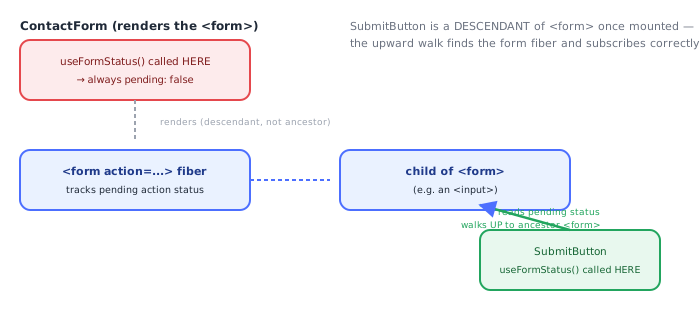
useFormStatus is unusual among the hooks in this curriculum: its hook node doesn't hold state that its own component produced. Instead, calling useFormStatus() walks up the fiber tree looking for the nearest ancestor <form> fiber and reads the pending action/transition status React DOM tracks on that form fiber — the same underlying pending-transition tracking that powers useActionState's pending flag for the action bound to that form. This is conceptually parallel to how useContext walks up to the nearest Provider fiber, though it is a dedicated React DOM mechanism specific to <form> elements and their action prop, not the general Context mechanism — there is no explicit <FormStatus.Provider> anywhere in your code; the <form> element itself is the implicit source React DOM tracks.
This walk-up-to-an-ancestor mechanism is exactly why calling useFormStatus() in the same component that renders the <form> tag doesn't work as one might hope: at the point that component's own function body is executing, it is the one about to render the <form> element — the form doesn't exist as a fiber yet, and even once it does, it's a descendant of that component, not an ancestor. The upward walk finds nothing and the hook returns its inactive default (pending: false, data: null). A genuinely separate child component, rendered inside the <form> tag's JSX, has that <form> fiber sitting above it in the tree once mounted, and the upward walk finds it and subscribes that child to re-render whenever the form's pending status changes.
⚠️ Common Pitfalls
- Calling
useFormStatusin the same component that renders the<form>— always returns the inactive default; extract a child component and call the hook there instead. - Importing from
"react"instead of"react-dom"—useFormStatusis a React DOM hook, not a core React hook. - Assuming it tracks any nearby form — it specifically reports the nearest ancestor
<form>; separate sibling forms each need their own descendant component independently calling the hook. - Confusing
pendingwith general async loading state — it reflects only the enclosing form's action transition, not arbitrary async work happening elsewhere in the app. - Expecting
datato be populated when not pending —dataisnulloutside of an in-flight submission; guard with optional chaining (data?.get(...)).
📋 Quick Reference
import { useFormStatus } from "react-dom";     → note: react-dom, not react
const { pending, data, method, action } = useFormStatus();
pending  → boolean, true while the ancestor form's action is in flight
data     → FormData | null, the in-flight submission's data
method   → "get" | "post"
action   → the form's action reference

Rule: must be called in a CHILD of the <form>, never the component rendering the <form> itself.
🧠 Key takeaways
const { pending, data, method, action } = useFormStatus().- Reads the status of the nearest parent
<form>: call it in a child component. - Great for reusable submit buttons and spinners without prop drilling.
- In the form's own component, use
isPendingfromuseActionStateinstead.
🎤 Interview Q&A
Q1What does useFormStatus return?core▾
Status of the nearest parent <form> submission: { pending, data, method, action }. It must be called from a component rendered inside the form.
- Why inside the form? It reads the status of the parent form via context.
Q2What's a typical use?core▾
A reusable SubmitButton that disables itself and shows a spinner while pending is true, without passing props from the form.
- Why reusable? Any form with an action gets pending state automatically.
Q3useFormStatus vs useActionState's isPending?core▾
useActionState's isPending is available where the hook is used (the form owner); useFormStatus lets nested components read status without prop drilling.
- Can you use both? Yes.
Q4Does it work with client-side onSubmit handlers?senior▾
It tracks submissions through form action (functions/server actions), not arbitrary onSubmit handlers with manual fetch.
- Implication? Use form actions to benefit.
Q5How do you show what was submitted while pending?core▾
Read data (FormData) from useFormStatus to show, e.g., 'Saving "My title"…'.
- Accessibility tip? Announce pending state with aria-live or disabled states.
🛠️ Practice exercises
Each exercise is a file in this topic folder. Code exercises are self-checking: run them and make the checks pass.
✅ Check yourself
Answer the questions — feedback is instant.