Custom Hooks
A custom hook is a function that calls other hooks, letting components share stateful logic. Extract a duplicated data-fetching pattern, understand that each call gets its own state, and keep following the rules of hooks.
🎯 What you'll learn
- A custom hook is just a function
- Sharing stateful logic, not state
- Composing hooks and returning a consistent shape
- The rules of hooks and how React tracks calls
1A Custom Hook Is Just a Function
There is no special API for defining a custom hook. It's an ordinary JavaScript function that happens to call one or more built-in hooks, and follows one naming convention: its name starts with use.
import { useEffect, useState } from "react";

// This IS a custom hook — nothing more than a function that calls other hooks
function useOnlineStatus(): boolean {
  const [isOnline, setIsOnline] = useState(navigator.onLine);

  useEffect(() => {
    function handleOnline() { setIsOnline(true); }
    function handleOffline() { setIsOnline(false); }
    window.addEventListener("online", handleOnline);
    window.addEventListener("offline", handleOffline);
    return () => {
      window.removeEventListener("online", handleOnline);
      window.removeEventListener("offline", handleOffline);
    };
  }, []);

  return isOnline;
}

function StatusBanner() {
  const isOnline = useOnlineStatus(); // reused across as many components as needed
  return <p>{isOnline ? "Online" : "Offline"}</p>;
}
The use prefix is not enforced by the language or by React at runtime — it's a convention the linter (eslint-plugin-react-hooks) relies on to know which functions must follow the Rules of Hooks (stable call order, top-level calls only). Naming a hook-calling function without the use prefix silently disables that linting, which is exactly why the convention matters in practice even though nothing crashes without it.
2Why Extract One: Sharing Stateful Logic, Not State Itself
Before hooks, sharing logic that involved lifecycle + state (like "track window width" or "subscribe to a WebSocket") required patterns like higher-order components or render props, both of which added a wrapper layer to the component tree. A custom hook shares the logic directly, with each call site getting its own independent instance of the underlying state:
function useWindowWidth(): number {
  const [width, setWidth] = useState(window.innerWidth);
  useEffect(() => {
    const onResize = () => setWidth(window.innerWidth);
    window.addEventListener("resize", onResize);
    return () => window.removeEventListener("resize", onResize);
  }, []);
  return width;
}

function Sidebar() {
  const width = useWindowWidth(); // its own independent useState/useEffect pair
  return <aside>{width < 768 ? "collapsed" : "expanded"}</aside>;
}

function Header() {
  const width = useWindowWidth(); // a SEPARATE independent pair — not shared state
  return <header>{width}px</header>;
}
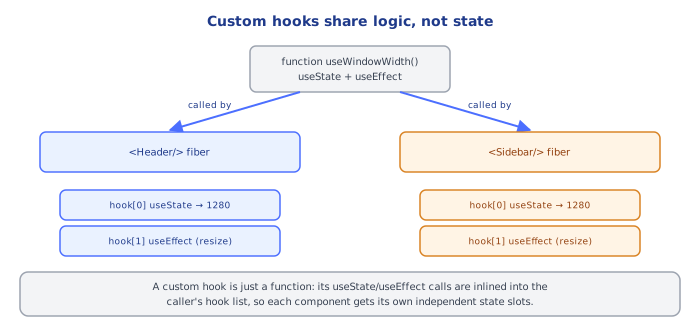
Sidebar and Header each get their own hook-list nodes on their own fibers. Calling useWindowWidth() twice does not mean two components read the same width variable — it means the same logic runs twice, producing two independently tracked values that happen to be computed the same way.
3Composing Hooks Inside Hooks
Custom hooks can call other custom hooks, building up behavior in layers — the same way ordinary functions compose:
function useDebouncedValue<T>(value: T, delayMs: number): T {
  const [debounced, setDebounced] = useState(value);
  useEffect(() => {
    const id = setTimeout(() => setDebounced(value), delayMs);
    return () => clearTimeout(id); // cancel the pending update if value changes again first
  }, [value, delayMs]);
  return debounced;
}

function useSearchResults(query: string) {
  const debouncedQuery = useDebouncedValue(query, 300); // composes an existing custom hook
  const [results, setResults] = useState<Product[]>([]);

  useEffect(() => {
    if (!debouncedQuery) { setResults([]); return; }
    let ignore = false;
    fetchProducts(debouncedQuery).then((data) => { if (!ignore) setResults(data); });
    return () => { ignore = true; }; // stale-request guard, as covered in the useEffect topic
  }, [debouncedQuery]);

  return results;
}
useSearchResults never needs to know that useDebouncedValue is implemented with useState + useEffect internally — it just calls it like any other hook and gets back a value. This is ordinary function composition; there's no additional mechanism at play.
4Returning a Consistent Shape
A custom hook can return a single value, an array (positional, like useState), or an object (named fields, like useActionState's tuple vs. a settings-style hook) — pick based on how callers will use it:
// Array return: good when there are 1-2 values almost always destructured
// together in the same order, and short names read fine positionally
function useToggle(initial = false): [boolean, () => void] {
  const [value, setValue] = useState(initial);
  const toggle = useCallback(() => setValue((v) => !v), []);
  return [value, toggle];
}
const [isOpen, toggleOpen] = useToggle();

// Object return: good when there are several values and callers likely
// only need some of them, or naming clarity matters more than brevity
function useFetch<T>(url: string): { data: T | null; error: Error | null; isLoading: boolean } {
  // ...
  return { data: null, error: null, isLoading: true };
}
const { data, isLoading } = useFetch<Product[]>("/api/products");5Custom Hooks Still Follow the Rules of Hooks
Because a custom hook is just a function that calls other hooks, every rule that applies to useState/useEffect/etc. applies transitively to it: it must be called unconditionally at the top level of a component (or another hook), never inside a loop, condition, or nested function:
function Panel({ showExtra }: { showExtra: boolean }) {
  // WRONG: conditionally calling a custom hook is exactly as broken as
  // conditionally calling useState — it shifts every subsequent hook's
  // position in the underlying fiber's hook list
  if (showExtra) {
    const extra = useExtraData(); // BREAKS the Rules of Hooks
  }

  // CORRECT: call unconditionally, then branch on the RESULT
  const extra = useExtraData();
  return showExtra ? <p>{extra}</p> : null;
}
Under the HoodHow it works internally▾
React does not attach state to the component function — a function component is just a function, called fresh every render with no persistent memory of its own. Hook data lives on the fiber, React's internal object representing one component instance, in a singly linked list of hook objects hanging off memoizedState, one node per hook call, walked in the exact order those calls happen every render.
The critical fact about custom hooks is that this mechanism has no awareness of function boundaries. When Sidebar calls useWindowWidth(), and useWindowWidth internally calls useState(...) and then useEffect(...), React's hook-list walk for Sidebar's fiber does not see a nested call into another function — it just sees, in sequence, "a useState call, then a useEffect call," and allocates/reads nodes 1 and 2 on Sidebar's fiber exactly as if Sidebar had written those two hook calls directly in its own body. The custom hook function is inlined, conceptually, into the caller's flat sequence of hook calls at the point it's called. This is why calling the same custom hook from two different components produces two completely independent sets of hook-list nodes, on two different fibers — there is no shared node, no shared memoizedState, and no communication between the two calls at all, only identical logic being run twice against separate storage.
This also explains precisely why the Rules of Hooks apply transitively. If useWindowWidth were called conditionally inside Sidebar, the hook-list walk for Sidebar's fiber would, on some renders, skip straight past the two nodes useWindowWidth would have claimed — and every hook call after it in Sidebar's body would silently read and write the wrong node, exactly as if Sidebar had written a raw useState inside an if. There is no special case in React's hook-matching algorithm for "this hook call came from inside another function" — call order is call order, regardless of how many function-call frames deep the actual useState/useEffect invocation sits.
Because of this, a custom hook is best understood not as "a new kind of hook" but as named, reusable call-order logic — a way to give a sequence of built-in hook calls (plus whatever plain JS glue sits between them) a name and a return value, so that sequence can be reused verbatim across components without copy-pasting it. All the underlying machinery — the fiber, the linked list, Object.is comparisons for any useMemo/useCallback/useEffect inside it, the transition tracking for any useActionState/useOptimistic inside it — is exactly the same machinery covered in every other topic in this curriculum. Nothing new is invented for custom hooks; they are purely an organizational technique built on top of everything else.
⚠️ Common Pitfalls
- Expecting two calls to the same custom hook to share state — each call site gets its own independent hook-list nodes; sharing actual state across components requires lifting it up (
useContext, a shared store, or passing it down as props), not just calling the same custom hook twice. - Calling a custom hook conditionally or inside a loop — breaks the fixed call-order the fiber's hook list depends on, exactly as with any built-in hook, because the custom hook's internal calls are just more entries in that same flat sequence.
- Omitting the
useprefix — silently opts the function out of theeslint-plugin-react-hookschecks that catch Rules-of-Hooks violations and stale-dependency bugs; the convention is what makes the tooling recognize it as a hook at all. - Forgetting cleanup logic inside a custom hook's internal
useEffect— a custom hook that subscribes to something (events, sockets, timers) needs the same cleanup-function discipline as any standaloneuseEffect; skipping it leaks the subscription every time a component using the hook unmounts. - Over-abstracting trivial logic into a custom hook — wrapping a single
useStatecall with no additional logic (function useCount() { return useState(0); }) usually adds indirection without benefit; extract a hook when there's real shared behavior (effects, derived values, composed hooks), not just to reduce two lines to one.
📋 Quick Reference
function useSomething(...) {
  // calls other hooks internally — useState, useEffect, useMemo, etc.
  return value;            // or [value, setter], or { field1, field2 }
}

Naming: MUST start with "use" — enables eslint-plugin-react-hooks checks
Rules of Hooks apply transitively — no conditional/looped calls, ever
Each call site = independent hook-list nodes on that caller's own fiber
Shared LOGIC, not shared STATE — lift state up separately if truly shared
🧠 Key takeaways
- A custom hook is a
use-prefixed function that calls other hooks. - It shares logic; each component calling it gets its own state.
- Return a consistent shape (object for many values, tuple for two); compose hooks inside hooks.
- Rules of hooks apply: top level, unconditional, same order (React tracks hooks by call order).
🎤 Interview Q&A
Q1What are custom hooks?core▾
Functions starting with use that call other hooks to encapsulate reusable stateful logic (data fetching, subscriptions, form handling). Each call gets its own independent state.
- Do custom hooks share state between components? No, only logic; share state with context or stores.
Q2Give examples of good custom hooks.core▾
useDebounce(value, delay), useLocalStorage(key), useMediaQuery(query), useOnlineStatus(), useFetch/useQuery wrappers, useEventListener.
- What makes them good? Single purpose, clear inputs/outputs, proper cleanup.
Q3How do you test custom hooks?core▾
With renderHook from React Testing Library, asserting results and using act for updates; or test them through a small component that uses them.
- Mocking timers? Use fake timers for debounce/throttle hooks.
Q4What design mistakes happen with custom hooks?senior▾
Hooks that do too much, return unstable values (new objects/functions every render), hide expensive effects, or ignore cleanup and race conditions.
- How do you stabilize outputs? useMemo/useCallback for returned objects and functions.
Q5When should logic be a custom hook vs a plain function?core▾
If it uses hooks (state, effects, context), it's a hook; otherwise a plain utility function is simpler and usable anywhere.
- Naming rule? Hooks must start with
useso lint rules apply.
🛠️ Practice exercises
Each exercise is a file in this topic folder. Code exercises are self-checking: run them and make the checks pass.
✅ Check yourself
Answer the questions — feedback is instant.