Ports
An IP address finds the machine; a port finds the process. See how one server port serves thousands of connections, each identified by its full 4-tuple, and why TCP and UDP ports are separate namespaces.
🎯 What you'll learn
- What a port identifies
- Well-known, registered and ephemeral ranges
- Client vs server ports
- Sockets and the 4-tuple; TCP vs UDP ports
📚 Before you start
1What a Port Actually Identifies
An IP address (see the IP/IPv4/IPv6 topic) gets a packet to the right host. But a host runs dozens of processes at once — a web server, a database, an SSH daemon — often all listening for network traffic simultaneously. A port is a 16-bit number that tells the transport layer (TCP or UDP — see the TCP vs UDP topic) which process on that host a packet is for.
IP address  → which HOST
Port number → which PROCESS on that host
Ports are a transport-layer concept, not a network-layer one — IP itself doesn't know or care about ports; TCP and UDP headers are what actually carry the source and destination port numbers.
2The Port Number Range and Its Bands
Ports are 16-bit unsigned integers, so they range from 0 to 65535 (2¹⁶ = 65536 total values). This range is split into three conventional bands:
| Range | Name | Meaning |
|---|---|---|
| 0 – 1023 | Well-known / system ports | Reserved for standard services; on most operating systems, binding to one requires elevated privileges |
| 1024 – 49151 | Registered ports | Assignable to specific applications by IANA, but not OS-privileged |
| 49152 – 65535 | Dynamic / ephemeral ports | Assigned automatically and temporarily, usually to the client side of an outgoing connection |
Common well-known ports worth memorizing on sight:
20/21  FTP (data/control)
22     SSH
25     SMTP
53     DNS
80     HTTP
443    HTTPS
3306   MySQL
5432   PostgreSQL
6379   Redis
27017 MongoDB3Client Ports vs Server Ports
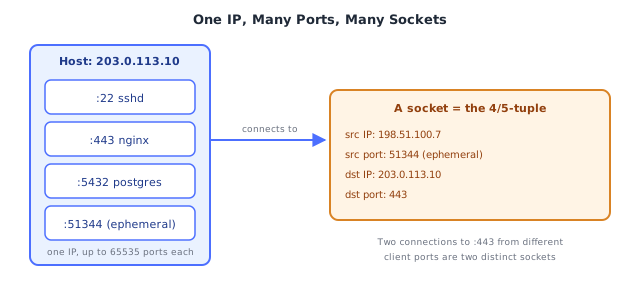
When your browser connects to https://example.com, two ports are involved, and they play very different roles:
- Server port (443): fixed, well-known, and the server is actively listening on it, waiting for any client to connect.
- Client port (an ephemeral port, e.g.
51344): chosen automatically by the client's operating system for this one connection, from the ephemeral range, and released when the connection closes.
This asymmetry is why you never have to "know" what port your browser is using — the OS picks a free ephemeral one for you on every outgoing connection, while the server's port has to be fixed and known in advance so clients can find it at all.
4Sockets: A Port Alone Doesn't Identify a Connection
A single port number identifies "which process," but a live TCP connection is uniquely identified by a 4-tuple:
(source IP, source port, destination IP, destination port)This is why a busy web server on port 443 can handle thousands of simultaneous connections through the same port — every one of those connections has a different client IP and/or client port, so the 4-tuple is unique per connection even though the server-side IP and port are identical every time. The operating system uses this 4-tuple (called a socket, in this context) to route incoming packets to the correct in-memory connection state.
Connection A: (198.51.100.7:51344 → 203.0.113.10:443)
Connection B: (198.51.100.9:51344 → 203.0.113.10:443)   ← different client IP, same client port — still unique
Connection C: (198.51.100.7:51400 → 203.0.113.10:443) ← same client IP, different client port — still unique5TCP Ports and UDP Ports Are Independent Namespaces
A subtlety that trips people up: TCP port 53 and UDP port 53 are completely separate. A process can bind TCP port 53 and a different process can simultaneously bind UDP port 53 on the same host, with no conflict — the protocol is part of what identifies the listener, not just the number. DNS actually does exactly this in practice (using UDP:53 for typical queries and TCP:53 for larger responses like zone transfers).
Under the HoodHow it works internally▾
What "listening" actually means at the OS level
When a server process calls something like bind() then listen() on a port, the operating system's TCP/IP stack registers that (protocol, port) pair against that process in its internal socket table. From that point, any inbound SYN packet (see the TCP vs UDP topic's handshake mechanics) addressed to that port gets handed to the listening process instead of being rejected. If no process is listening on a given port, the OS's default behavior is to respond with a TCP RST (reset) — this is the actual mechanism behind "connection refused," not some generic error; the OS is explicitly telling the remote side "nothing is here to accept this."
Why only one process can bind a given (protocol, port) combination
The OS socket table is keyed by (protocol, local IP, local port) at minimum. If two processes both tried to bind TCP port 443 on all interfaces, the kernel would have no way to decide which process should receive an inbound SYN for that port — so the second bind() call fails with "address already in use." (There are narrow, explicit exceptions — like SO_REUSEPORT letting multiple processes share a port for load distribution — but those require the processes to opt in explicitly; it isn't the default.)
Why ephemeral ports get reused, and what TIME_WAIT is for
When a client closes a TCP connection, the OS doesn't necessarily free that ephemeral port instantly — a closed connection can sit in a TIME_WAIT state for a configured interval (historically around 2 minutes, tunable) before the OS considers the port fully free again. This exists so that any stray, delayed packets from the old connection that arrive late don't get misinterpreted as belonging to a brand-new connection that happens to reuse the same 4-tuple. Under high connection churn (a load balancer opening/closing thousands of short-lived connections per second), a host can actually run out of usable ephemeral ports if TIME_WAIT sockets accumulate faster than they expire — a genuine, real-world capacity problem, not a theoretical one.
Why privileged ports (0-1023) require elevated permissions
On Unix-like systems, binding to a port below 1024 has historically required root/administrator privileges. The security reasoning: if any unprivileged local user could bind port 80 or port 22, they could impersonate a system service to other local users or processes that trust "whatever is listening on the well-known port" — this convention exists to make well-known ports a trustworthy signal about what is running there, not just a habit.
⚠️ Common Pitfalls
- Thinking a port is a physical thing — a port is purely a number in a packet header; there is no separate "wire" per port. All 65536 possible ports for a given host share the exact same physical network interface.
- Assuming TCP and UDP ports are the same namespace — binding UDP port 53 has zero effect on whether TCP port 53 is free; they are tracked completely independently by the OS.
- Believing the client always uses the same source port for every connection — the OS typically assigns a fresh ephemeral port per outgoing connection; assuming a fixed client port breaks under NAT (see the NAT/DHCP/ARP topic) and under connection reuse scenarios.
- Confusing "port is closed" with "port is filtered" — a closed port (nothing listening) typically gets an active
RSTreply; a filtered port (blocked by a firewall — its own topic) typically gets no reply at all, which is why a port scan can take much longer against a well-firewalled host — it's waiting out timeouts on filtered ports instead of getting an instant RST. - Forgetting
TIME_WAITcan exhaust ephemeral ports under load — a service that opens huge numbers of short-lived outbound connections can genuinely run out of usable source ports before those ports finish expiring, causing failed outbound connections that look unrelated to "too many ports in use" at first glance. - Assuming a well-known port number guarantees what's running there — port 443 is conventionally HTTPS, but nothing stops a process from listening on it with a completely different protocol; the number is a strong convention, not an enforced contract.
📋 Quick Reference
Port = 16-bit number (0-65535), identifies WHICH PROCESS on a host
IP address = identifies WHICH HOST

0-1023      well-known/system (often privileged to bind)
1024-49151  registered
49152-65535 ephemeral/dynamic (typically client-side, auto-assigned)

Socket = (src IP, src port, dst IP, dst port) — the actual unique connection identifier
TCP:53 and UDP:53 are independent namespaces — no conflict between them

No listener on a port  → OS replies RST ("connection refused")
Firewall blocks a port → typically no reply at all ("filtered" / times out)
🧠 Key takeaways
- A port (16 bits) identifies a process endpoint on a host; well-known < 1024, ephemeral ~32768–60999 on Linux.
- Servers listen on a fixed port; clients use ephemeral ports chosen by the OS.
- A connection is a 4-tuple: one server port serves many clients.
- TCP 53 and UDP 53 are different sockets; ephemeral port exhaustion happens with many outbound connections to one destination.
🎤 Interview Q&A
Q1What is a port and why is it needed?core▾
A 16-bit number identifying a process/service on a host, so one IP can run many services. A connection is identified by the 5-tuple: protocol, source IP, source port, destination IP, destination port.
- Port ranges? 0–1023 well-known, 1024–49151 registered, 49152–65535 ephemeral (dynamic).
Q2Name some well-known ports.core▾
22 SSH, 25 SMTP, 53 DNS, 80 HTTP, 443 HTTPS, 3306 MySQL, 5432 PostgreSQL, 6379 Redis, 27017 MongoDB, 9092 Kafka, 5672 RabbitMQ.
- Why can't normal users bind to port 80 on Linux? Ports below 1024 require root or the CAP_NET_BIND_SERVICE capability.
Q3What's ephemeral port exhaustion?senior▾
Outgoing connections use ephemeral source ports; many short-lived connections to the same destination can exhaust them (TIME_WAIT), causing connection failures. Fix with connection pooling/keep-alive, widening the port range, or more source IPs.
- Where is it common? Services calling one API heavily without connection reuse.
Q4How do you check which process is listening on a port?core▾
ss -ltnp or lsof -i :8080 on Linux/macOS, netstat -ano on Windows.
- And test whether a remote port is open?
nc -vz host portortelnet host port.
Q5What's the difference between binding to 0.0.0.0 and 127.0.0.1?core▾
127.0.0.1 accepts only local connections; 0.0.0.0 listens on all interfaces, exposing the service to the network. Containers must bind to 0.0.0.0 for port mappings to work.
- Common Docker bug? An app listening on localhost inside the container is unreachable from outside.
🛠️ Practice exercises
Each exercise is a file in this topic folder. Code exercises are self-checking: run them and make the checks pass.
✅ Check yourself
Answer the questions — feedback is instant.