NAT, DHCP, and ARP
Three protocols run silently every time a device joins a network and talks to the internet: DHCP hands out an address, ARP finds the next hop's MAC, and NAT shares one public IP. Watch each one.
🎯 What you'll learn
- DHCP's DORA exchange
- ARP: IP → MAC on the local link
- NAT/PAT and its translation table
- Inspecting them and the usual failure modes
📚 Before you start
These three protocols quietly do most of the work that makes a modern local network usable. Each solves a different, specific problem: DHCP hands out addresses automatically, ARP finds the physical hardware address behind an IP address, and NAT lets many private addresses share one public one. None of them are optional in a typical home or office network — they run constantly, invisibly, underneath everything else in this course.
1DHCP — Dynamic Host Configuration Protocol
Every device on an IP network needs an IP address, a subnet mask, a default gateway, and DNS server addresses (later topics) before it can do anything useful. Manually typing all of that into every laptop, phone, and printer that joins a network would be unworkable at scale. DHCP automates it.
The DHCP handshake: DORA
When a device joins a network, it broadcasts for configuration using a four-step exchange, commonly remembered as DORA:
- Discover — the new device broadcasts "is there a DHCP server out there? I need an address" (it has no IP yet, so this is a broadcast, not addressed to any specific host).
- Offer — a DHCP server on the network replies with a proposed IP address and configuration (subnet mask, gateway, DNS, lease time).
- Request — the device broadcasts back "I accept that offer" (broadcast again, in case multiple DHCP servers made offers — this tells all of them which offer won).
- Acknowledge — the server confirms, finalizing the lease — the address is now assigned to that device for a defined period of time.
Client                          DHCP Server
  |----- DISCOVER (broadcast) ------>|
  |<---- OFFER (192.168.1.50) -------|
  |----- REQUEST (I'll take it) ---->|
  |<---- ACK (lease confirmed) ------|
Leases
A DHCP-assigned address isn't permanent — it's a lease with an expiration time. Before the lease expires, the client renews it (typically directly with the server, skipping the full DORA cycle); if a device disconnects and never renews, the address eventually becomes available for the server to hand out again. This is why the same laptop can get a different IP address on the same network after being off for a while — nothing guarantees the same address is still free.
2ARP — Address Resolution Protocol
IP addresses get a packet to the right network and host logically, but the actual delivery within a local network segment happens using MAC addresses — the hardware addresses burned into network interfaces, used at the data link layer (see the OSI model topic). Before a host can send a frame to another host on the same local network, it needs to know: "what MAC address corresponds to this IP address?" That's what ARP answers.
How ARP resolution works
- Host A wants to send a packet to
192.168.1.20, which it knows (from its routing logic) is on its own local network. - Host A checks its ARP cache — a local table mapping recently-resolved IP → MAC pairs. If
192.168.1.20is already there, it uses that MAC immediately, no network traffic needed. - If not cached, Host A broadcasts an ARP request to the entire local network: "who has 192.168.1.20? Tell me your MAC address."
- Only the host that actually owns
192.168.1.20replies, directly to Host A, with its MAC address. - Host A caches the answer and sends the actual frame using that MAC address as the destination.
Host A broadcasts: "Who has 192.168.1.20? Tell 192.168.1.10"
        ↓ (every host on the LAN sees this broadcast)
Host at .20 replies directly: "192.168.1.20 is at aa:bb:cc:dd:ee:ff"
Critically, ARP only works within a single local broadcast domain — a broadcast never crosses a router. If the destination is on a different network, ARP resolves the MAC address of the default gateway (the router) instead, not the final destination — the router itself figures out the next hop from there.
3NAT — Network Address Translation
As covered in the IP/IPv4/IPv6 topic, private IP addresses (like 192.168.1.10) aren't routable on the public internet. NAT, running on your router/gateway, is what lets a device with a private address actually reach the internet — by rewriting its packets to use the router's one public address instead.
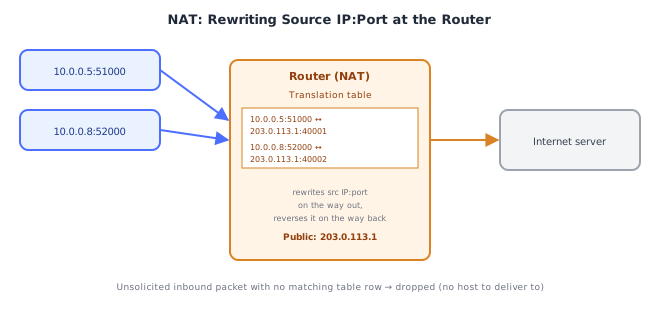
What NAT actually rewrites
The specific, common form is NAPT / PAT (Network Address Port Translation, sometimes called "NAT overload") — the kind used by nearly every home router:
- Host
10.0.0.5sends a packet from source10.0.0.5:51000to some server at93.184.216.34:443. - The router rewrites the packet's source IP and source port to its own public address and a port it picks, say
203.0.113.1:40001, and records this mapping in a translation table. - The packet leaves with source
203.0.113.1:40001— the destination server only ever sees the router's public address, never10.0.0.5. - When the reply comes back addressed to
203.0.113.1:40001, the router looks up its translation table, finds it maps to10.0.0.5:51000, rewrites the destination back, and forwards it to the correct private host.
This is exactly why many different private hosts behind one router can all reach the internet simultaneously through a single public IP — each gets a distinct translated port, keeping every connection's return traffic routable back to the correct internal host.
Under the HoodHow it works internally▾
NAT: why unsolicited inbound connections don't work
The translation table is built outbound-first — a row only exists because an internal host initiated a connection out. If a packet arrives from the internet addressed to the router's public IP on some port with no corresponding row already in the table, the router has no idea which internal host it's for, and drops it. This is the actual, mechanical reason NAT blocks unsolicited inbound connections: it's not a firewall policy decision, it's simply that there is no translation entry to reverse. This is also why gaming, VoIP, and self-hosted servers behind NAT often need port forwarding — a manually configured, permanent, static row in that same translation table, telling the router "always send inbound traffic on port X to this specific internal host," so that unsolicited inbound traffic has somewhere to go.
Note precisely what NAT does and doesn't provide: it happens to make unsolicited inbound connections impossible as a side effect of how translation works, but it enforces no policy, inspects no traffic content, and isn't configurable per rule the way a real firewall (its own topic) is — conflating "behind NAT" with "protected by a firewall" is a common and consequential mistake.
ARP: why the cache exists and why it can be poisoned
Broadcasting an ARP request for every single packet would be wasteful — the ARP cache stores resolved IP→MAC pairs for a short time (commonly tens of seconds to a few minutes, OS-dependent) so repeated communication with the same host doesn't re-resolve every time. You can inspect it directly:
arp -a
# ? (192.168.1.1) at aa:bb:cc:dd:ee:ff on en0 ifscope [ethernet]
Because ARP has no built-in authentication — any host on the local network can reply to an ARP request, and most implementations will even accept unsolicited ARP replies nobody asked for — a malicious host can send forged ARP replies claiming to own an IP address it doesn't (ARP spoofing/poisoning), redirecting traffic meant for that IP through the attacker's machine instead. This is possible specifically because ARP resolution trusts replies without verifying who's allowed to answer for a given IP — a direct consequence of the protocol's simplicity, and a large part of why it's confined to trusted local networks rather than used across the wider internet.
DHCP: why leases exist instead of permanent assignment
If DHCP assignments were permanent, every address ever handed out would stay "used" forever, even after the device left the network — a growing network would eventually exhaust its address pool with addresses nobody is actually using. Leases with expiration let the DHCP server reclaim addresses from devices that disappeared without a clean disconnect, keeping the address pool usable indefinitely as devices come and go. This is also why static IP assignment (manually configuring a fixed address, bypassing DHCP) is used deliberately for servers and infrastructure that must not have their address change out from under them — DHCP's automatic renegotiation is a feature for laptops and phones, and a liability for anything that other systems need to reliably find at a fixed address.
⚠️ Common Pitfalls
- Believing NAT is a firewall — NAT blocking unsolicited inbound traffic is an accidental side effect of the translation table, not an enforced security policy; a host with a port forwarded through NAT is exactly as exposed on that port as if it had a public IP directly.
- Assuming ARP works across the internet — ARP is strictly local-network-only; resolving an address on a different network resolves the gateway's MAC, never the far-end host's MAC directly.
- Assuming a device's IP address never changes — under DHCP, a lease can expire and be renewed with a different address, especially after being offline; anything that needs a stable address (a server, a printer other systems point to by IP) should use a DHCP reservation or static IP, not assume DHCP will "usually" give the same one back.
- Not realizing ARP replies are unauthenticated — treating a LAN as inherently trustworthy ignores that any device on it can claim to be any IP via ARP; this is a real, exploitable weakness on shared or untrusted local networks (public Wi-Fi, for example).
- Confusing DHCP lease renewal with the full DORA process — a renewing client typically talks directly to the server it already has a lease from, without re-broadcasting Discover; only a device with no current lease (or one that's expired) goes through full DORA.
- Forgetting port forwarding punches a permanent hole — a forwarded port bypasses NAT's "no inbound without an outbound first" protection entirely and permanently for that port, which is exactly why it should be scoped as narrowly as possible.
📋 Quick Reference
DHCP — automatic IP configuration
  DORA: Discover → Offer → Request → Acknowledge
  Leases expire and renew; no guarantee of the same address twice

ARP — IP-to-MAC resolution, LOCAL NETWORK ONLY
  Broadcast request → unicast reply → cached locally (ARP cache)
  Cross-network destination → resolves the GATEWAY's MAC, not the far host's
  No authentication → spoofable (ARP poisoning)

NAT (specifically NAPT/PAT) — many private IPs share one public IP
  Rewrites (src IP, src port) → (public IP, translated port)
  Translation table built OUTBOUND-first
  No matching table row for inbound traffic → dropped (not a firewall decision, just no route back)
  Port forwarding = a manual, permanent table row enabling unsolicited inbound traffic
🧠 Key takeaways
- DHCP (Discover, Offer, Request, Ack) leases an IP, gateway and DNS servers.
- ARP maps an IP to a MAC on the local link via broadcast; it's unauthenticated (spoofable).
- NAT/PAT rewrites private source IP:port to one public IP with distinct ports; inbound needs forwarding.
- 169.254.x.x = DHCP failed; duplicate IPs and stale ARP caches cause intermittent connectivity.
🎤 Interview Q&A
Q1What does NAT do?core▾
Network Address Translation rewrites private source addresses (and ports, with PAT) to a public IP when traffic leaves a network, tracking connections to translate replies back. It lets many devices share one public IPv4 address.
- Downside? Inbound connections need port forwarding, and peer-to-peer gets hard (hence STUN/TURN).
Q2How does DHCP work?core▾
DORA: the client broadcasts Discover, servers Offer an address, the client Requests one, the server Acknowledges. The lease includes IP, subnet mask, gateway, DNS servers and lease duration.
- What happens when no DHCP server answers? The client may self-assign a 169.254.x.x link-local address.
Q3What is ARP?core▾
Address Resolution Protocol maps an IPv4 address to a MAC address on the local network: a broadcast 'who has 10.0.0.5?' gets a reply with the MAC, cached in the ARP table. IPv6 uses Neighbor Discovery instead.
- What's ARP spoofing? An attacker answers ARP requests with their MAC to intercept traffic (man-in-the-middle).
Q4What's a NAT gateway in the cloud?senior▾
A managed service that lets instances in private subnets make outbound internet connections (updates, external APIs) without being reachable from the internet.
- Cost gotcha? Per-GB processing charges; use VPC endpoints for AWS services like S3.
Q5How does NAT affect long-lived connections?core▾
NAT devices drop idle mappings after a timeout, silently breaking idle TCP connections (WebSockets, DB pools). Use keep-alives/heartbeats shorter than the NAT idle timeout.
- Typical AWS NAT idle timeout? 350 seconds.
🛠️ Practice exercises
Each exercise is a file in this topic folder. Code exercises are self-checking: run them and make the checks pass.
✅ Check yourself
Answer the questions — feedback is instant.