Routing, Subnets, and CIDR
CIDR notation describes a block of addresses in one string. Calculate masks and host counts interactively, split blocks into subnets, and follow longest-prefix-match routing between subnets and out to the internet.
🎯 What you'll learn
- What routing is: longest prefix match
- CIDR notation and subnet masks
- Network/broadcast addresses and usable hosts
- Subnetting math, default gateways and routing between subnets
📚 Before you start
1What Routing Actually Is
The IP/IPv4/IPv6 topic covered what an address is. Routing is the separate question of how a packet gets from a source address to a destination address when they aren't on the same local network. Every router (and every host, in a smaller way) keeps a routing table: a list of rules mapping "packets headed to this range of addresses" to "send them out this interface, toward this next hop."
Destination         Gateway         Interface
0.0.0.0/0            203.0.113.1     eth0        (default route — "everything else")
192.168.1.0/24        (directly connected)  eth1        (local subnet — no gateway needed)
10.0.0.0/8             10.0.0.1        eth1        (route to another private network)
A router (or a host) picks the most specific matching route — the entry with the longest matching prefix wins over a more general one. If a packet's destination matches both 10.0.0.0/8 and a default 0.0.0.0/0 route, the /8 entry wins because it's more specific.
2CIDR Notation, Precisely
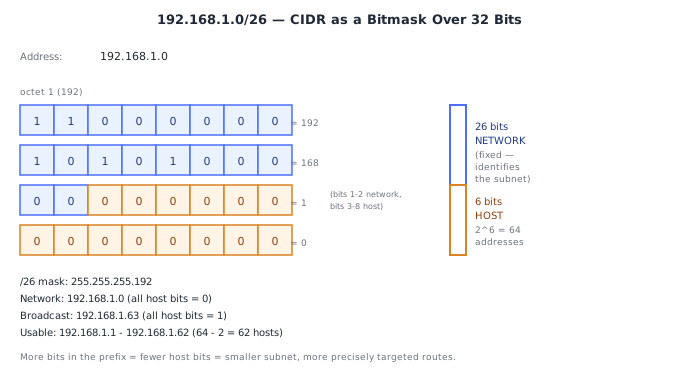
CIDR (Classless Inter-Domain Routing) is the notation <address>/<prefix-length> — the number after the slash says how many of the address's leading bits are the network portion; the rest are the host portion.
192.168.1.0/24
              ^^ — first 24 bits are the network, remaining 8 bits identify hosts within it

11000000.10101000.00000001.00000000   <- 192.168.1.0 in binary
|------ network (24 bits) ------|host|
A /24 network has 8 host bits, so 2⁸ = 256 possible addresses (192.168.1.0 through 192.168.1.255), though (as covered below) not all of them are usable for hosts.
CIDR replaced the older rigid "class A / B / C" system (fixed /8, /16, /24 boundaries only) with arbitrary prefix lengths — an organization that needs 500 addresses can get a /23 (510 usable) instead of being forced into a wasteful /16 (65,000+ addresses) or a too-small /24 (254).
3Subnet Masks — the Same Information, Different Notation
A subnet mask expresses the same network/host split as a CIDR prefix, but as a dotted-decimal number with the network bits set to 1 and host bits set to 0.
/24  =  255.255.255.0    (11111111.11111111.11111111.00000000)
/16  =  255.255.0.0      (11111111.11111111.00000000.00000000)
/25  =  255.255.255.128  (11111111.11111111.11111111.10000000)
A host determines whether another address is on its own local network by AND-ing its own address and the destination address with the subnet mask — if the results match, the destination is local (deliver directly via the link layer); if not, it's remote (send to the default gateway instead).
My address:       192.168.1.10   mask /24
Dest A:            192.168.1.200  → AND with mask → 192.168.1.0 == my network → LOCAL
Dest B: 192.168.2.50 → AND with mask → 192.168.2.0 != my network → REMOTE, send to gateway4Network Address, Broadcast Address, and Usable Hosts
Every subnet reserves its first address (all host bits 0) as the network address (identifies the subnet itself, never assigned to a host) and its last address (all host bits 1) as the broadcast address (a packet sent here reaches every host on that subnet). Both are unusable as individual host addresses.
192.168.1.0/24:
  Network address:    192.168.1.0     (unusable)
  First usable host:  192.168.1.1     (commonly the gateway/router)
  Last usable host:   192.168.1.254
  Broadcast address:  192.168.1.255   (unusable)
→ 256 total addresses, 254 usable5Subnetting Math: Carving a Block into Smaller Pieces
Subnetting means borrowing host bits to create more, smaller networks. Each bit you move from the host portion to the network portion doubles the number of subnets and halves the number of hosts per subnet.
Start: 192.168.1.0/24  → 1 network, 254 usable hosts

Borrow 1 bit → /25:  2 subnets, 126 usable hosts each
  192.168.1.0/25    (hosts .1  – .126,  broadcast .127)
  192.168.1.128/25  (hosts .129 – .254, broadcast .255)

Borrow 2 bits → /26:  4 subnets, 62 usable hosts each
  192.168.1.0/26    (.1–.62)
  192.168.1.64/26   (.65–.126)
  192.168.1.128/26  (.129–.190)
  192.168.1.192/26  (.193–.254)
The general formulas, for a subnet with h host bits remaining:
Total addresses in subnet = 2^h
Usable host addresses     = 2^h - 2   (minus network + broadcast)
Number of subnets from borrowing b bits = 2^b
This is exactly how a cloud VPC gets carved into smaller subnets per availability zone or tier (e.g. a /16 VPC split into /24 subnets, one per AZ) — the math is identical whether it's a home router or a cloud network console doing the carving.
6The Default Gateway
A host's default gateway is the router it sends a packet to whenever the destination isn't on its own local subnet (i.e., the packet doesn't match the mask-AND test in section 3). The gateway is itself just a host on the local subnet — but one with routes configured to know how to reach the wider network beyond it.
Host 192.168.1.50/24, default gateway 192.168.1.1
  → destination 192.168.1.75 (local)   → send directly (ARP-resolve, deliver on-link)
  → destination 8.8.8.8 (not local)    → send to 192.168.1.1, let the gateway route it onward
Without a correctly configured default gateway, a host can talk to other devices on its own subnet but nothing beyond it — a classic symptom that immediately points at gateway/routing misconfiguration rather than DHCP or DNS.
7Routing Between Subnets
Two hosts on different subnets, even on the same physical switch, cannot talk directly at the IP layer — traffic between subnets must pass through a router (or a Layer-3 switch acting as one), even if a single wire could physically connect them. This is a deliberate design point, not an implementation accident: subnet boundaries are where administrative/security policy gets enforced (this is exactly where a firewall's ingress/egress rules, covered in the next topic, typically sit).
Subnet A (192.168.1.0/24) ---\
                               >--- Router (has an interface, and a route, on both) --- Subnet B (192.168.2.0/24)
Subnet B (192.168.2.0/24) ---/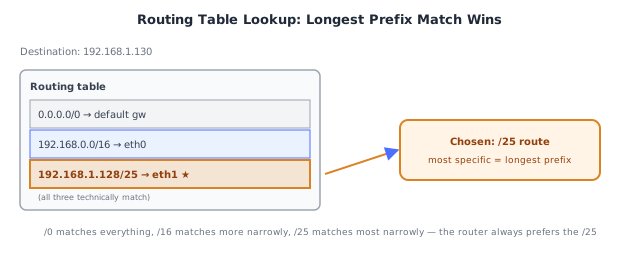
⚠️ Common Pitfalls
- Confusing a subnet mask with a regular IP address —
255.255.255.0looks like an address but represents a bit pattern (24 ones then 8 zeros), not a location; always keep the CIDR prefix-length notation (/24) as the mental model, the dotted-decimal mask is just an alternate encoding. - Forgetting the network and broadcast addresses are unusable — a
/24has 256 total addresses but only 254 usable hosts; off-by-two errors here are the most common subnetting mistake. - Assuming two hosts "look" like they're on the same network because their addresses are numerically close —
192.168.1.200and192.168.2.10are NOT on the same/24network despite looking similar; always do the actual mask-AND comparison, not a visual guess. - Believing a switch alone can route between subnets — a plain Layer-2 switch forwards frames within one broadcast domain/subnet; crossing a subnet boundary always requires a Layer-3 device (router or L3 switch) with a route.
- Over- or under-subnetting a VPC/network from the start — carving too many small subnets wastes address space on unusable network/broadcast addresses per subnet; carving too few forces a disruptive re-IP later when a tier grows past its subnet's capacity.
📋 Quick Reference
CIDR:  <address>/<prefix-length> — prefix bits = network, rest = host
Mask:  same info as dotted-decimal (/24 = 255.255.255.0)
Local vs remote test: AND both addresses with the mask, compare results
Network address = all host bits 0 (unusable)
Broadcast address = all host bits 1 (unusable)
Usable hosts = 2^(host bits) - 2

Borrowing b host bits → 2^b more subnets, each with 2^(h-b) addresses

Default gateway: where a host sends anything NOT on its own subnet
Crossing subnets ALWAYS requires a router/L3 device, regardless of physical wiring

/24 = 254 usable   /25 = 126 usable   /26 = 62 usable   /27 = 30 usable   /28 = 14 usable
🧠 Key takeaways
- /p = network bits; the address count is 2^(32−p): /24 = 256, /16 = 65,536.
- Usable hosts = total − 2 (network + broadcast); clouds reserve more (AWS: 5).
- Splitting by k extra bits gives 2^k subnets of /(p+k).
- Routers use longest prefix match;
0.0.0.0/0is the default route. Plan non-overlapping CIDRs for VPC peering.
🎤 Interview Q&A
Q1What does CIDR notation mean?core▾
10.0.0.0/16 means the first 16 bits are the network prefix, leaving 16 bits for hosts (65,536 addresses). A /24 has 256 addresses, /28 has 16. In AWS, 5 addresses per subnet are reserved.
- How many addresses in a /20? 2^(32−20) = 4,096.
Q2How do you plan subnets for a VPC?core▾
Choose a non-overlapping private range (to allow peering/VPN later), e.g. 10.0.0.0/16, then split per availability zone and tier: public subnets (load balancers, NAT), private app subnets, and isolated data subnets, leaving room for growth.
- Why avoid overlapping ranges? Overlapping CIDRs can't be peered or routed between.
Q3How does a router choose a route?core▾
Longest prefix match: the most specific route wins (a /24 beats a /16), with a default route 0.0.0.0/0 as the fallback.
- What's a default route in a public subnet?
0.0.0.0/0→ internet gateway; in a private subnet → NAT gateway.
Q4What's the difference between static and dynamic routing?senior▾
Static routes are configured manually; dynamic routing protocols (OSPF inside networks, BGP between networks/ISPs) exchange routes automatically and adapt to failures.
- What is BGP? The internet's routing protocol between autonomous systems; misconfigurations can cause large outages.
Q5How do you check if two IPs are in the same subnet?core▾
Apply the subnet mask to both (bitwise AND) and compare the network addresses. 10.0.1.5/24 and 10.0.2.5/24 are in different subnets; with /16 they're the same.
- Tool?
ipcalcor Python'sipaddressmodule.
🛠️ Practice exercises
Each exercise is a file in this topic folder. Code exercises are self-checking: run them and make the checks pass.
✅ Check yourself
Answer the questions — feedback is instant.