Performance Optimization and Bottlenecks
Measure first, then optimize the bottleneck. Separate latency from throughput, find where time actually goes, apply the highest-value wins first, and use Amdahl's law to predict what an optimization can achieve.
🎯 What you'll learn
- Measure first: baselines, percentiles, profiling
- Latency vs throughput
- Where bottlenecks live: CPU, I/O, locks, network
- Typical wins in order of value/effort, and Amdahl's law for optimization
📚 Before you start
1Measure First
"Premature optimization is the root of all evil" — the full quote continues: "…yet we should not pass up our opportunities in that critical 3%."
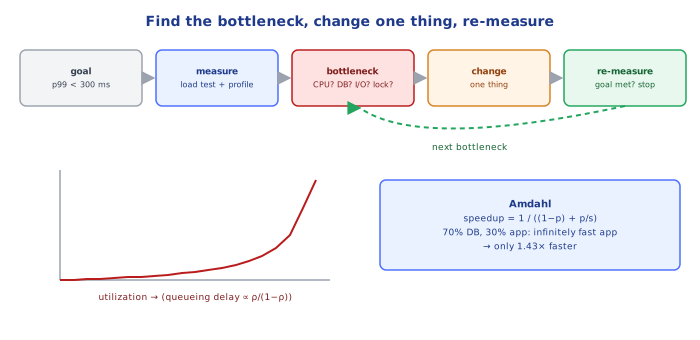
The critical 3% is found by measurement, not intuition. The workflow:
1. define the goal      p99 latency < 300 ms at 2,000 req/s; or batch job < 10 min
2. measure baseline     load test / production metrics / profiles
3. find THE bottleneck  the one resource limiting throughput or latency right now
4. change one thing     smallest change that relieves it
5. measure again        did the goal metric move? did something else get worse?
6. repeat until the goal is met — then stop2Latency vs Throughput
- Latency: time for one operation (report percentiles — p50, p95, p99, p99.9; averages hide the tail users feel).
- Throughput: operations per unit time.
- They're linked by Little's Law:
concurrency = throughput × latency. A service handling 500 req/s at 200 ms average has ~100 requests in flight; if latency doubles at the same arrival rate, in-flight requests double — and thread pools, connection pools and memory fill up.
As utilization of a resource approaches 100%, queueing delay grows non-linearly (for an M/M/1 queue, wait ∝ ρ/(1−ρ)): at 50% utilization waiting ≈ 1× service time, at 90% ≈ 9×, at 95% ≈ 19×. That's why systems "fall off a cliff" and why you keep headroom.
3Where Bottlenecks Live
| Resource | Symptoms | Tools |
|---|---|---|
| CPU | high CPU, latency grows with load, event-loop lag (Node) | CPU profiler, flame graphs (--cpu-prof, perf, py-spy, async-profiler) |
| memory / GC | GC pauses, rising heap, swapping | heap profiles, GC logs (04-memory_and_resource_management/) |
| I/O: database | slow queries, lock waits, connection pool waiting | EXPLAIN ANALYZE, pg_stat_statements, slow-query log (databases/indexing-storage/04-query_optimization) |
| I/O: network/downstream | time spent waiting on HTTP calls | distributed traces (devops-cloud/observability/03-…) |
| contention | locks, single-threaded hot spots, connection pool exhaustion | lock profiling, pool metrics |
| algorithmic | time grows superlinearly with data | profiling with realistic data sizes; complexity analysis (languages/javascript/24-time_and_space_complexity) |
4Typical Wins, Roughly in Order of Value/Effort
- Don't do the work: remove N+1 queries (
databases/indexing-storage/05-n_plus_1_query_problem), unnecessary calls, over-fetching (SELECT *), repeated parsing. - Do it once: caching (with invalidation —
databases/caching/), memoization, precomputation. - Do it in bulk: batch queries/requests, bulk inserts, pipelining.
- Do it in parallel (independent I/O):
Promise.allinstead of sequential awaits — with bounded concurrency. - Do it later: move non-critical work to background jobs (
backend/frameworks/16-background_jobs). - Do it closer: CDN, edge caching, regional replicas.
- Do it more efficiently: better algorithm/data structure (O(n²) → O(n log n),
Array.includesin a loop →Set), indexes, streaming. - Do it on more hardware: scale up/out — last, and only once the code isn't wasting it.
5Profiling in Practice (Node.js)
node --cpu-prof server.js                 # writes .cpuprofile on exit → open in Chrome DevTools
npx clinic flame -- node server.js        # flame graph under load
npx autocannon -c 100 -d 30 http://localhost:3000/orders   # load generator
A flame graph shows stack samples: width = time spent in that function (including callees). Look for wide plateaus at the top (hot leaf functions) and unexpectedly wide frames (JSON.parse of huge payloads, regex backtracking, sync crypto, logging).
For latency in distributed systems, traces show which hop dominates; for databases, pg_stat_statements ranks queries by total time.
Under the HoodAmdahl's Law, Again — Now for Optimization▾
If a request spends 70% of its time waiting on the database and 30% in application CPU, making the application code infinitely fast improves latency by at most 30% (1 / 0.7 ≈ 1.43×). Speeding up the database part by 2× gives 1 / (0.3 + 0.35) ≈ 1.54×. The general form — speedup = 1 / ((1 − p) + p / s) for a fraction p sped up by s — is why profiling comes first: optimization effort only pays off in proportion to the share of time the optimized part actually takes. It also explains diminishing returns: after the dominant cost is fixed, the next bottleneck is somewhere else, and continuing to polish the first one does nothing.
⚠️ Common Pitfalls
- Optimizing without measuring — micro-optimizing code that isn't on the hot path.
- Averages instead of percentiles.
- Benchmarking with toy data — O(n²) looks fine at n = 100.
- Running at 90%+ utilization — no headroom, tail latency explodes.
- Unbounded parallelism as an "optimization" — overloads downstreams.
- Caching without invalidation — fast and wrong.
📋 Quick Reference
goal → baseline → bottleneck → one change → re-measure → stop at goal
Little's law: in-flight = throughput × latency · utilization near 100% ⇒ queueing explodes
wins: avoid work > cache > batch > parallelize I/O > defer > move closer > better algorithm > more hardware
tools: flame graphs, EXPLAIN ANALYZE, pg_stat_statements, traces, load generators
🧠 Key takeaways
- Measure first: baseline p50/p95/p99, profile, then change one thing.
- Latency (time per request) and throughput (requests per second) are different goals.
- Typical wins: fix N+1 queries and missing indexes, cache, batch, avoid blocking work, reduce payloads, then micro-optimize.
- Amdahl: speeding up 20% of the time by 10× gives only ~1.2× overall. Optimize the dominant cost.
🎤 Interview Q&A
Q1How do you approach a performance problem?core▾
Measure first: define the target (e.g. p99 < 200 ms), reproduce, profile or trace to find the bottleneck, fix the biggest one, measure again. Never optimize by guesswork; the bottleneck is often not where you expect.
- Which tools? APM/tracing for distributed systems, profilers (dotTrace, async-profiler, py-spy, Chrome DevTools) for code.
Q2What are the usual bottlenecks in web backends?core▾
Database (slow queries, missing indexes, N+1, lock contention), network calls to other services, serialization, CPU-heavy code paths, memory/GC pressure, and thread/connection pool exhaustion.
- Most common one? The database.
Q3Latency vs throughput: how do optimizations differ?core▾
Latency optimizations shorten the critical path (caching, parallelizing independent calls, fewer round trips). Throughput optimizations increase work per unit time (batching, async I/O, horizontal scaling), sometimes at the cost of per-request latency.
- Little's law? Concurrency = throughput × latency; useful for sizing pools and capacity.
Q4Why focus on tail latency (p99) rather than average?senior▾
Averages hide slow requests that real users hit, and with fan-out a single page may depend on dozens of calls, so a rare slow call becomes common at the page level.
- Techniques for the tail? Timeouts, hedged requests, avoiding GC pauses, load balancing on least-loaded.
Q5How do you load test properly?core▾
Use realistic traffic mixes and data volumes in a production-like environment, ramp up gradually, measure latency percentiles, errors and resource saturation, and find the breaking point. Avoid coordinated omission in tools (use open-model load generators).
- Tools? k6, Gatling, Locust, JMeter.
🛠️ Practice exercises
Each exercise is a file in this topic folder. Code exercises are self-checking: run them and make the checks pass.
✅ Check yourself
Answer the questions — feedback is instant.