Autoscaling in Kubernetes
Scale pods with the HPA or KEDA, right-size them with the VPA, and add nodes with Karpenter or Cluster Autoscaler. Compute HPA decisions yourself, then watch the layers cooperate during a traffic spike.
🎯 What you'll learn
- Three layers: pods horizontally, pods vertically, nodes
- HPA math, metrics sources and behaviour tuning
- KEDA for event-driven scaling and scale to zero
- Karpenter vs Cluster Autoscaler, PDBs and headroom
1Three Layers of Autoscaling
| Layer | What scales | Tools |
|---|---|---|
| Pods horizontally | number of replicas | HorizontalPodAutoscaler (HPA), KEDA |
| Pods vertically | requests/limits of each Pod | VerticalPodAutoscaler (VPA), in-place resize |
| Nodes | number/size of machines | Cluster Autoscaler, Karpenter |
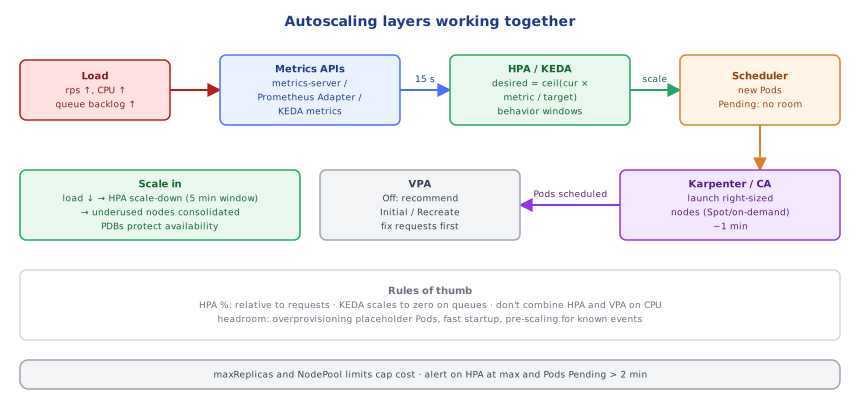
They work together: HPA adds Pods → some are Pending for lack of capacity → the node autoscaler adds nodes → Pods schedule. When load drops, HPA removes Pods → nodes become underused → the node autoscaler consolidates and removes them.
2HorizontalPodAutoscaler
apiVersion: autoscaling/v2
kind: HorizontalPodAutoscaler
metadata: { name: api }
spec:
  scaleTargetRef: { apiVersion: apps/v1, kind: Deployment, name: api }
  minReplicas: 3
  maxReplicas: 30
  metrics:
    - type: Resource
      resource:
        name: cpu
        target: { type: Utilization, averageUtilization: 65 }   # % of *requests*
    - type: Pods
      pods:
        metric: { name: http_requests_per_second }               # via Prometheus Adapter
        target: { type: AverageValue, averageValue: "50" }
  behavior:
    scaleUp:
      stabilizationWindowSeconds: 0
      policies: [{ type: Percent, value: 100, periodSeconds: 30 }]   # at most double every 30 s
    scaleDown:
      stabilizationWindowSeconds: 300                                # wait 5 min before shrinking
policies: [{ type: Pods, value: 2, periodSeconds: 60 }]- Formula:
desired = ceil(current × currentMetric / target); with multiple metrics, the highest wins. - Needs metrics-server for CPU/memory; custom/external metrics via Prometheus Adapter or KEDA.
- CPU utilization is relative to requests — wrong requests mean wrong scaling.
- Memory is a poor HPA signal for most runtimes (memory rarely drops after load).
- Don't set
replicasin the Deployment manifest when an HPA manages it (GitOps will fight the HPA).
3KEDA: Event-Driven Autoscaling
KEDA scales on external event sources — queue length (SQS, RabbitMQ, Kafka lag), cron schedules, Prometheus queries — and can scale to zero:
apiVersion: keda.sh/v1alpha1
kind: ScaledObject
metadata: { name: thumbnail-worker }
spec:
  scaleTargetRef: { name: thumbnail-worker }
  minReplicaCount: 0
  maxReplicaCount: 50
  cooldownPeriod: 120
  triggers:
    - type: aws-sqs-queue
      metadata: { queueURL: "https://sqs.eu-west-1.amazonaws.com/111111111111/thumbnails", queueLength: "20", awsRegion: eu-west-1 }
      authenticationRef: { name: keda-aws-pod-identity }
Queue-based scaling targets the cause (backlog) rather than the symptom (CPU) — ideal for workers.
4VerticalPodAutoscaler
VPA observes actual usage and recommends (or applies) requests. Modes: Off (recommendations only — great for right-sizing), Initial (set at Pod creation), Recreate/InPlaceOrRecreate (update running Pods). Don't let VPA and HPA both act on CPU for the same workload.
5Node Autoscaling
- Cluster Autoscaler: scales predefined node groups (ASGs) up when Pods are Pending and down when nodes are underutilized and their Pods can move elsewhere.
- Karpenter: provisions right-sized nodes directly from Pending Pods' requirements (instance types, arch, Spot/on-demand, zones) in about a minute, and consolidates continuously by replacing/removing underused nodes.
apiVersion: karpenter.sh/v1
kind: NodePool
metadata: { name: default }
spec:
  template:
    spec:
      requirements:
        - { key: karpenter.sh/capacity-type, operator: In, values: [spot, on-demand] }
        - { key: kubernetes.io/arch, operator: In, values: [arm64, amd64] }
      nodeClassRef: { group: karpenter.k8s.aws, kind: EC2NodeClass, name: default }
  limits: { cpu: "400" }
  disruption: { consolidationPolicy: WhenEmptyOrUnderutilized, consolidateAfter: 1m }
Protect workloads during scale-down with PodDisruptionBudgets and graceful shutdown; mark Pods that must not move with karpenter.sh/do-not-disrupt.
Under the HoodThe HPA Control Loop▾
Every 15 seconds the HPA controller (in kube-controller-manager) reads metrics for the target's Pods from the metrics APIs (metrics.k8s.io from metrics-server, custom.metrics.k8s.io/external.metrics.k8s.io from adapters such as Prometheus Adapter or KEDA's metrics server). For resource metrics it averages usage over Pods as a percentage of their requests, ignoring Pods that are not yet ready or are missing metrics (conservatively assuming 0% on scale-up / 100% on scale-down for those), and skips scaling if the ratio is within a 10% tolerance. It computes a recommendation per metric, takes the maximum, applies behavior policies and the stabilization window (scale-down uses the highest recommendation over the last 5 minutes to prevent flapping), and updates the scale subresource of the Deployment. New Pods then need to be scheduled — if no node fits, they're Pending until Karpenter or Cluster Autoscaler adds capacity, which is why fast-booting nodes, pre-pulled images and some headroom (overprovisioning with low-priority placeholder Pods) matter for spiky traffic.
⚠️ Common Pitfalls
- No or wrong requests — HPA percentages and bin-packing are meaningless.
- HPA on memory for runtimes that never release memory.
replicasin Git fighting the HPA.- Scale-down too aggressive — flapping; no PDBs during consolidation.
- Slow startup (big images, long JVM warm-up) making autoscaling too late; use startup probes, pre-scaling or KEDA cron triggers.
- No
maxReplicas/node limits — a bug or attack scales your bill.
📋 Quick Reference
HPA autoscaling/v2: CPU % of requests · custom/external metrics · behavior (stabilization, policies) · max of metrics
KEDA: event sources (SQS, Kafka lag, cron, Prometheus) · scale to zero
VPA: Off (recommend) / Initial / Recreate · not with HPA on same resource
nodes: Cluster Autoscaler (node groups) · Karpenter (NodePools, Spot, consolidation) · PDBs
🧠 Key takeaways
- Pods scale horizontally (HPA/KEDA) and vertically (VPA); nodes scale with Karpenter or Cluster Autoscaler.
- HPA:
desired = ceil(current × metric/target)on % of requests, so wrong requests mean wrong scaling; tunebehavior. - KEDA scales on queue length/lag and can scale to zero; don't combine HPA and VPA on the same CPU metric.
- Keep headroom, use PDBs, set max replicas and node limits, and alert when the HPA sits at max.
🎤 Interview Q&A
Q1What autoscalers does Kubernetes have?core▾
HPA scales pod replicas on metrics (CPU, memory, custom/external). VPA adjusts pod resource requests. Cluster Autoscaler/Karpenter adds or removes nodes based on pending pods and utilization. KEDA scales on event sources (queue length), including to zero.
- Can HPA and VPA scale on CPU together? Not on the same metric; they conflict.
Q2Why must pods have resource requests for HPA?core▾
CPU utilization targets are a percentage of requests; without requests, HPA can't compute utilization. Requests also drive scheduling and node autoscaling.
- Requests vs limits? Requests reserve capacity; limits cap usage (CPU throttling, memory OOM-kill).
Q3Which metric should you scale on?core▾
The one that reflects load and saturation: requests per second or concurrency for web services, queue depth/lag for workers, CPU only if it correlates. Custom metrics come via Prometheus Adapter or KEDA.
- Why is CPU often misleading? I/O-bound services can be saturated at low CPU.
Q4How do you avoid scaling flapping and slow reactions?senior▾
Tune HPA behaviour (stabilization windows, scale-up/down policies), keep pods fast to start, over-provision with low-priority placeholder pods for node headroom, and use predictive or scheduled scaling for known peaks.
- What are placeholder pods? Low-priority pods that reserve capacity and get evicted for real workloads.
Q5How do you protect availability during scale-down and node drains?core▾
PodDisruptionBudgets limit simultaneous voluntary disruptions, graceful termination handles SIGTERM, and topology spread constraints keep replicas across nodes and zones.
- What's a PDB? e.g. minAvailable: 2 ensures at least two pods remain during drains.
🛠️ Practice exercises
Each exercise is a file in this topic folder. Code exercises are self-checking: run them and make the checks pass.
✅ Check yourself
Answer the questions — feedback is instant.