Helm: Packaging Kubernetes Applications
Helm packages Kubernetes manifests as charts: templates plus values, installed as versioned releases you can upgrade and roll back. See how values merge and render, how upgrades work under the hood, and when Kustomize is the better fit.
🎯 What you'll learn
- Charts, values, releases and repositories (incl. OCI)
- Templates, helpers and value precedence
- Hooks, tests, --atomic upgrades and rollbacks
- Helm vs Kustomize
📚 Before you start
1Why Helm
Raw YAML repeats itself across environments and services. Helm is the Kubernetes package manager: a chart is a templated bundle of manifests with default values; installing a chart with specific values creates a release that Helm can upgrade, roll back and uninstall as a unit. Charts are also how most third-party software is distributed (ingress-nginx, cert-manager, Prometheus, External Secrets — 03-configmaps_and_secrets/).
helm repo add ingress-nginx https://kubernetes.github.io/ingress-nginx
helm upgrade --install ingress-nginx ingress-nginx/ingress-nginx \
  -n ingress-nginx --create-namespace --version 4.11.3 -f values/ingress-prod.yaml
helm list -A
helm history api -n petpal
helm rollback api 4 -n petpal
helm template api ./charts/api -f values/prod.yaml   # render locally, no cluster
helm diff upgrade api ./charts/api -f values/prod.yaml # (helm-diff plugin)2Chart Structure
charts/api/
├── Chart.yaml            # name, version (chart), appVersion, dependencies
├── values.yaml           # defaults
├── values.schema.json    # optional JSON Schema validation of values
├── templates/
│   ├── _helpers.tpl      # named templates (labels, names)
│   ├── deployment.yaml
│   ├── service.yaml
│   ├── ingress.yaml
│   ├── hpa.yaml
│   ├── NOTES.txt         # printed after install
│   └── tests/test-connection.yaml
└── charts/ # vendored dependencies# Chart.yaml
apiVersion: v2
name: api
version: 1.8.0 # chart version — bump on every chart change
appVersion: "1.4.2" # version of the app it deploys
dependencies:
- name: redis
version: 20.x.x
repository: oci://registry-1.docker.io/bitnamicharts
condition: redis.enabled3Templates and Values
Templates use Go templates plus Sprig functions:
# templates/deployment.yaml
apiVersion: apps/v1
kind: Deployment
metadata:
  name: {{ include "api.fullname" . }}
  labels: {{- include "api.labels" . | nindent 4 }}
spec:
  {{- if not .Values.autoscaling.enabled }}
  replicas: {{ .Values.replicaCount }}
  {{- end }}
  selector:
    matchLabels: {{- include "api.selectorLabels" . | nindent 6 }}
  template:
    metadata:
      labels: {{- include "api.selectorLabels" . | nindent 8 }}
      annotations:
        checksum/config: {{ include (print $.Template.BasePath "/configmap.yaml") . | sha256sum }}
    spec:
      containers:
        - name: api
          image: "{{ .Values.image.repository }}:{{ .Values.image.tag | default .Chart.AppVersion }}"
          resources: {{- toYaml .Values.resources | nindent 12 }}
          {{- with .Values.env }}
          env:
            {{- range $k, $v := . }}
            - name: {{ $k }}
              value: {{ $v | quote }}
            {{- end }}
{{- end }}# values.yaml
replicaCount: 2
image: { repository: ghcr.io/petpal/api, tag: "" }
resources: { requests: { cpu: 250m, memory: 256Mi }, limits: { memory: 512Mi } }
autoscaling: { enabled: false, minReplicas: 2, maxReplicas: 10, targetCPU: 65 }
ingress: { enabled: false, host: "" }
env: { LOG_LEVEL: info }Override per environment with -f values/prod.yaml or --set image.tag=1.4.3 (later sources win). Built-in objects: .Values, .Release (Name, Namespace, Revision), .Chart, .Capabilities, .Files. The checksum/config annotation makes Pods roll when config changes.
4Hooks, Tests and Lifecycle
- Hooks (
helm.sh/hook: pre-upgrade) run Jobs at lifecycle points — e.g. database migrations before an upgrade (keep them idempotent and backward compatible). helm testruns Pods annotated as tests after install.helm upgrade --atomic --wait --timeout 5mrolls back automatically if resources don't become ready.- Charts are published to OCI registries (
helm push chart.tgz oci://ghcr.io/petpal/charts) or HTTP repos; sign/verify with provenance or cosign.
5Helm vs Kustomize
Kustomize (built into kubectl apply -k) uses plain YAML bases plus overlays with patches — no templating language. Many teams use Helm for third-party software and Kustomize (or Helm) for their own apps; Argo CD and Flux support both (08-production_practices_and_gitops/).
Under the HoodWhat helm upgrade Does▾
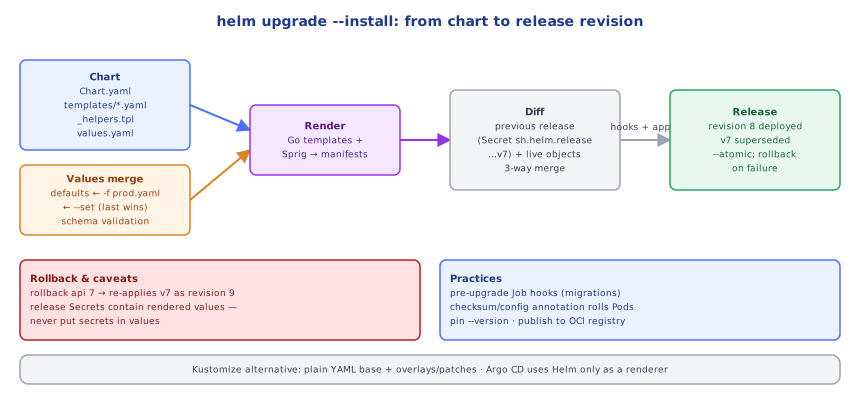
Helm 3 is client-only (no Tiller). helm upgrade --install api ./chart -f prod.yaml (1) loads the chart and dependencies, merges values (chart defaults ← parent chart values ← -f files in order ← --set), and validates against values.schema.json; (2) renders all templates into manifests; (3) loads the previous release from a Secret in the release namespace (sh.helm.release.v1.api.v7, a gzipped, base64-encoded record of chart, values and rendered manifests); (4) computes a three-way strategic merge between the old manifest, the new manifest and the live object so that changes made by others (e.g. an HPA's replica count, if not templated) are preserved where possible; (5) runs pre-upgrade hooks, applies the changes via the API server, optionally waits for readiness, runs post-upgrade hooks; (6) stores the new revision as ...v8 with status deployed (the old one becomes superseded). helm rollback api 7 re-applies revision 7's stored manifests as a new revision 9. Because release state lives in Secrets, anyone with read access to those Secrets can read the values — including any secrets you passed as values.
⚠️ Common Pitfalls
- Secrets in values files committed to Git (and stored in release Secrets).
- Not pinning chart versions (
--version) — surprise upgrades. - Over-templating — charts so generic nobody can read them.
- Forgetting to bump
versionin Chart.yaml. - Non-idempotent migration hooks that fail on retry.
- Manual
kubectl editon Helm-managed resources — overwritten on next upgrade.
📋 Quick Reference
helm repo add/update · upgrade --install -f values --version --atomic --wait · list · history · rollback · template · lint
chart: Chart.yaml (version, appVersion, deps) · values.yaml (+ schema) · templates/ (_helpers.tpl, NOTES.txt, tests)
templating: {{ .Values.x }} · include/nindent/toYaml/quote/default · if/with/range · checksum annotations
hooks: pre-install/pre-upgrade Jobs · OCI registries · release state in Secrets · Kustomize = overlays, no templates
🧠 Key takeaways
- A chart = templates + default values; installing it creates a versioned release.
- Values merge defaults ← -f files ← --set; render locally with
helm template, diff with helm-diff. - Use --atomic --wait, pin chart versions, and use idempotent hooks for migrations.
- Never put secrets in values (release Secrets store rendered values); Kustomize suits plain-YAML overlays.
🎤 Interview Q&A
Q1What is Helm?core▾
A package manager for Kubernetes: charts are templated manifests with default values; installing a chart creates a release with version history for upgrades and rollbacks.
- Where are release records stored? As Secrets in the release's namespace (Helm 3).
Q2How do values and templates work?core▾
Templates use Go templating with .Values, .Release and helpers; users override defaults with -f values-prod.yaml or --set. helm template renders locally; helm diff shows changes before upgrading.
- Common pitfall? Complex templating logic that's hard to read and debug.
Q3Helm vs Kustomize?senior▾
Helm: templating, packaging, versioned releases, dependency charts; good for distributing apps. Kustomize: template-free overlays patching plain YAML; simpler for environment variations. They can be combined.
- Which is built into kubectl? Kustomize (
kubectl apply -k).
Q4How do you manage secrets with Helm?core▾
Avoid plain secrets in values files: use helm-secrets with SOPS, External Secrets Operator, or reference existing Secrets created by other tooling.
- Why not --set password=...? It lands in shell history and release records.
Q5How do you test and validate charts?core▾
helm lint, schema validation via values.schema.json, helm template plus kubeconform, chart-testing (ct) in CI installing into a kind cluster, and helm test hooks.
- What's a hook? Resources run at lifecycle points like pre-upgrade migrations.
🛠️ Practice exercises
Each exercise is a file in this topic folder. Code exercises are self-checking: run them and make the checks pass.
✅ Check yourself
Answer the questions — feedback is instant.